

- Quick summary
- How do you plan smart home routines in 2026?
- How do you automate the morning routine?
- How do you automate departures and partial-away days?
- How do you automate daytime comfort and work-from-home?
- How do you automate evenings and entertainment?
- How do you automate night mode, vacations, and resilience?
- Which platforms fit these routine blocks best?
- What changes in older Westchester homes?
- What does a five-block project cost and how long does it take?
- What do we sign off before programming starts?
- Checklist: what should be confirmed before programming?
- Frequently asked questions
- References
- Related resources
Quick summary
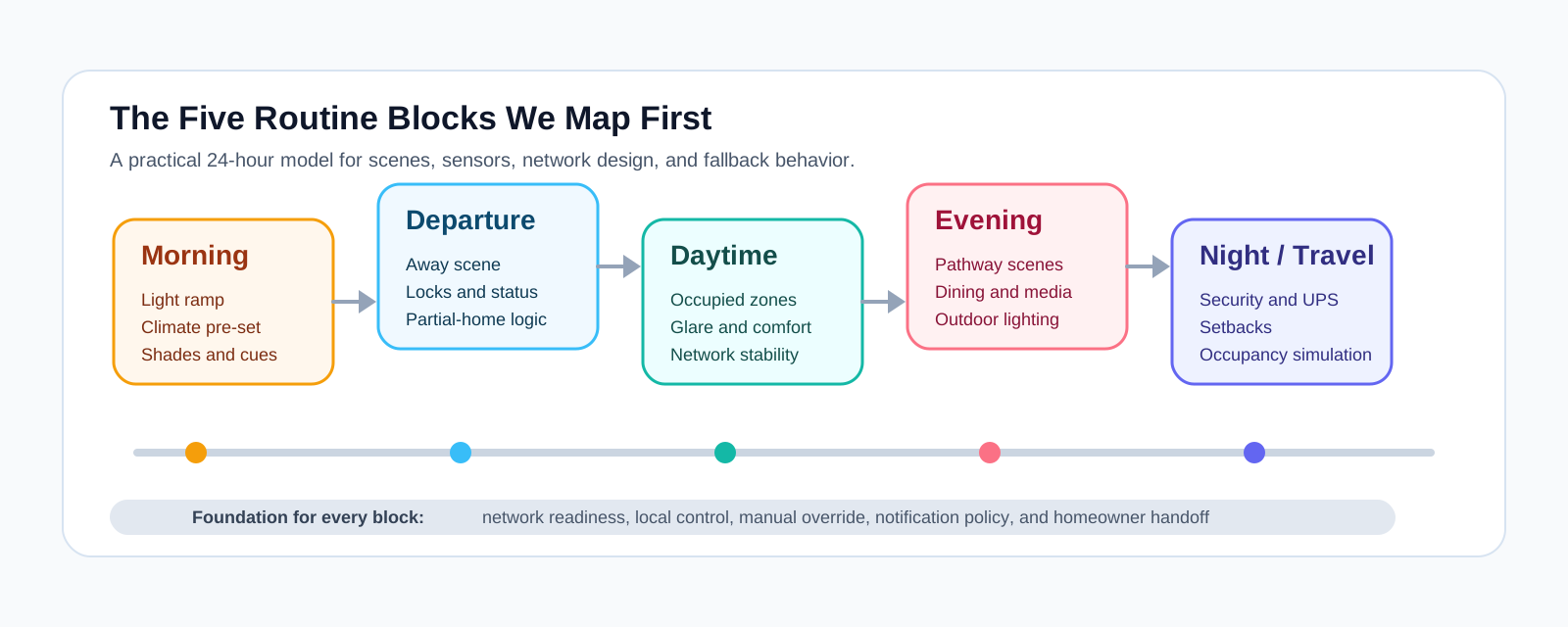
The five routine blocks are the repeatable parts of the day we design first: morning, departure, daytime, evening, and night or travel. Mapping those blocks before hardware selection lets us choose scenes, sensors, keypads, network requirements, and fallback behavior that match how the household actually lives.
In 2026, that planning step also has to account for presence sensing, platform limits, local-vs-cloud behavior, and the network backbone that keeps cameras, shades, and control points responsive. The goal is not to automate everything. The goal is to automate the parts of the day that repeat often enough to deserve reliable shortcuts.
How do you plan smart home routines in 2026?
A 2026 smart home routine plan starts by defining the household's five repeatable dayparts and the triggers, controls, and exceptions inside each one. We do that before final programming because the right automation logic depends on occupancy, platform limits, and the physical realities of the house.
The workshop is part lifestyle review and part systems review. We sketch the timeline, identify which rooms and devices matter in each block, and note where the system must keep working even if the internet is down or a phone is not available. We also separate convenience automations from safety-critical behavior so presence sensing, geofencing, and cloud notifications are never treated as life-safety controls.
-
Note every trigger: schedule, sunrise, motion, door state, keypad press, geofence, or presence signal.
-
Define ownership: who can adjust scenes, on which device, and with what guardrails.
-
Record dependencies: Wi-Fi coverage, PoE budgets, local controllers, HVAC integration, and shade power.
-
Document exceptions: pets at home, hybrid workdays, guest suites, cleaners, caregivers, and overnight visitors.
How do you automate the morning routine?
A smart home morning routine gradually raises light levels, adjusts temperature, and activates only the occupied zones so the house starts smoothly without app hunting. Morning routines work best when they are predictable enough to feel automatic but simple enough to override in one press.
We usually define at least three morning variants: weekday, weekend, and work-from-home. That matters because the kitchen, mudroom, and primary suite often need different timing than a guest wing or home office. In homes with shades, heated floors, or hot-water recirculation, the morning block is also where comfort timing either feels polished or obviously late.
-
Ramp bedroom and hallway lighting over 10 to 15 minutes instead of switching to full output instantly.
-
Pre-heat or pre-cool the occupied living areas while leaving unused zones in setback.
-
Tilt or raise shades for daylight where glare is useful, not disruptive.
-
Trigger kitchen audio, reminders, or quiet chimes only in the zones that are actually active.
How do you automate departures and partial-away days?
A departure routine should secure the house, reduce unnecessary energy use, and confirm status in one action. The best version is not "everything off." It is "the right parts of the house change state when the last relevant person leaves."
This is where partial-away logic matters. A hybrid workday should not shut down the office wing just because one phone crossed the geofence. In 2026, we are more likely to combine phone location, Wi-Fi presence, occupancy sensors, and manual keypads than rely on any single signal alone. Presence sensing is useful for convenience, but we still give homeowners a visible all-off or away control at the door.
-
Build one-step away scenes for the whole house and separate scenes for office, guest, or caregiver zones.
-
Lower HVAC usage while keeping pet, plant, or server-room constraints in view.
-
Confirm lock, garage, gate, and alarm status in the app and at the keypad.
-
Raise camera sensitivity, exterior lighting, or doorbell alerting only after the home is actually empty.
How do you automate daytime comfort and work-from-home?
Daytime automation keeps occupied rooms comfortable, protects quiet work zones, and reduces waste in empty areas.
For work-from-home households, the daytime block usually includes task lighting, shade positions for glare control, camera and chime rules that do not interrupt calls, and occupancy logic that distinguishes a briefly empty room from a genuinely unused floor. Network design matters here as much as automation logic. In larger or denser homes, multi-gig uplinks, wired backhaul, and Wi-Fi 7 features like multi-link operation can improve supported client links, but most hubs and bridges still benefit more from wired connections and proper access-point placement than from MLO itself.
-
Keep offices, studios, and classrooms at comfort setpoints while letting unused rooms drift efficiently.
-
Use occupancy or presence signals to hold a room active longer when someone is likely to return.
-
Coordinate shades with monitor glare, privacy, and afternoon solar heat gain.
-
Route delivery and service notifications to the right chimes, displays, or phones instead of every speaker in the house.
How do you automate evenings and entertainment?
Evening automation coordinates arrivals, cooking, homework, and media with clear scenes instead of app juggling.
This block usually carries the widest mix of lighting, audio, shade, and climate interactions, so it needs the clearest scene design.
We typically split evening logic into two layers: pathway and family activity. Pathway scenes handle entries, mudrooms, stairs, and outdoor approaches. Activity scenes handle kitchen prep, dining, homework, patio use, and media. That separation keeps the house responsive without forcing every family member into the same "movie mode" just because someone dimmed one room.
-
Trigger pathway lighting from garage, driveway, or entry activity with short fade-outs after arrival.
-
Shift kitchen and dining scenes from task-heavy brightness to softer dinner levels at the right time.
-
Recall TV, projector, or audio presets from a remote or keypad without burying basics inside an app.
-
Sync outdoor lighting and selected landscape zones to sunset with weather-aware overrides when needed.
How do you automate night mode, vacations, and resilience?
Night and travel routines should secure the property, reduce HVAC use, preserve safe pathway lighting, and keep core functions operating during short outages or cloud disruptions. This block is where reliability matters most because people are either asleep or away.
Goodnight scenes normally lock perimeter doors, lower or close shades, arm the right security zones, and move the home into quieter lighting behavior. Travel scenes add occupancy simulation, restrained notifications, and clearer fallback rules. Thermostat setbacks belong here too: the U.S. Department of Energy says a 7 to 10 degree setback for 8 hours a day can save up to 10% per year on heating and cooling, which is one reason sleep and away schedules deserve real planning rather than ad hoc app use.
Alert behavior needs careful wording. Mainstream consumer platforms reliably support notifications, but phone-call-style escalations are not a safe generic assumption for home automation alerts in 2026. We only spec call workflows when a doorbell, intercom, monitoring service, or pro-control platform explicitly supports that path. For everything else, we define which events stay as push notifications, which trigger recordings, and which belong in professionally monitored security.
-
Use goodnight scenes that secure doors, arm the right sensors, and leave low-level stair or bath lighting available.
-
Simulate occupancy during travel with varied lighting and shade schedules tied to sunset and normal room use.
-
Keep core lighting, security, and control processors on local logic with UPS backup where appropriate.
-
Write down fallback behavior for internet loss, power restoration, and manual overrides so the system stays understandable.
Presence sensing is better, Matter covers more device categories, and Wi-Fi 7 is part of more network conversations, but none of that replaces a clear control plan. The winning projects still pair dependable wall controls with local logic where it matters and treat apps and voice as convenience layers.
Which platforms fit these routine blocks best?
Platform choice matters because the five routine blocks are only as usable as the control layer behind them. Matter improved interoperability, but it did not make Apple Home, Google Home, Home Assistant, and professional systems equally capable.
| Platform | Best fit | Where it works well | Where we usually move up a tier |
|---|---|---|---|
| Apple Home | Apple-first households that want the cleanest shared app | Morning, arrive/leave, locks, thermostats, shades, and a short list of daily scenes | When the house needs deeper cross-brand logic, more custom notifications, or more layered zone behavior |
| Google Home | Nest users and voice-first households | Presence-based convenience, common-area voice control, and approachable everyday routines | When local control, mixed protocols, or more complex automation ownership matter |
| Home Assistant | Mixed-brand homes that want local-first control | Complex occupancy logic, cross-brand integrations, and durable local automations | When the homeowner does not want to own updates, dashboards, and long-term maintenance |
| Control4 or Savant | Larger custom homes with AV, intercom, and deeper whole-home control | Multi-zone entertainment, dedicated keypads, touch panels, and broader integration across lighting, shades, security, and media | When the project is small enough that a simpler consumer platform and fewer control points are the better answer |
If a household needs a simple layer for lighting, locks, thermostats, and a few scenes, Apple Home or Google Home may be enough. If the brief includes mixed brands, local ownership, and more conditional logic, Home Assistant usually fits better. If the house needs broad AV, intercom, keypad, camera, and room-by-room control under one higher-touch system, that is when we more often specify Control4 or Savant.
What changes in older Westchester homes?
Older Westchester homes need tighter routine plans because plaster walls, hydronic heat, and finished trim limit retrofit options.
Generic advice breaks down quickly in plaster-and-lath colonials, stone homes, and partial renovations.
In Scarsdale, Bronxville, Rye, Larchmont, and similar markets, we often see thick plaster walls, limited switch-box space, hydronic heat, detached garages, and finished trim that homeowners do not want reopened. That pushes the plan toward a smaller number of better controls, stronger RF or wired backbones, battery shades where appropriate, and a more deliberate access-point layout. Winter also changes the rhythm of the house, so entry lighting, mudroom heat timing, and camera visibility through snow or early darkness deserve explicit treatment.
-
Prioritize keypads, dimmers, and shades where daily friction is highest instead of trying to automate every room.
-
Expect Wi-Fi and camera planning to be room-by-room in plaster, stone, or metal-lath construction.
-
Set realistic thermostat expectations in boiler or radiator homes because scheduling is not the same as zoning.
-
Decide early whether detached structures, gates, or outdoor living zones belong in the same routine map.
What does a five-block project cost and how long does it take?
A five-block smart home project in Westchester ranges from a focused retrofit to a phased whole-home design.
These are Westchester planning ranges we use in 2026, not universal national prices, and the actual number still depends on scope, finish conditions, and how much of the house is being coordinated at once.
| Project scope | Typical planning range | What is usually included | Typical timeline |
|---|---|---|---|
| Focused retrofit layer | $3,000 to $8,000 installed | Core lighting scenes, thermostat integration, one or two locks or door stations, and a few dependable routines | Usually 1 to 2 site visits plus follow-up tuning |
| Priority rooms with shades or AV | $8,000 to $20,000+ | More keypads, motorized shades in selected rooms, entertainment scenes, and stronger network or control prep | Commonly 2 to 6 weeks depending on hardware and finish conditions |
| Whole-home five-block design | $20,000 to $75,000+ and sometimes well beyond | Broader lighting, shade, AV, security, control processors, documentation, and homeowner training across multiple zones | Usually phased over design, installation, programming, and post-move-in adjustments |
The scheduling pattern matters as much as the budget. A light retrofit can move quickly once the control plan is clear. A larger whole-home project takes longer because the routine map has to coordinate with electricians, builders, network work, shade lead times, and homeowner training. That is exactly why we prefer to define the five blocks before final device shopping.
- 1Workshop and discovery: map the five routine blocks, exceptions, and success criteria.
- 2System design: choose platforms, control points, network requirements, and hardware scope.
- 3Installation and programming: deploy the backbone, program scenes, and test each block.
- 4Homeowner handoff: train the household, confirm fallback behavior, and schedule early adjustments.
What do we sign off before programming starts?
Before we write final automation logic, we turn the five blocks into a project plan with owners, scene definitions, and resilience notes. Every block needs a success test so the finished system can be verified against real use instead of vague expectations.
| Workshop focus | Primary outputs | Sign-off owner |
|---|---|---|
| Morning and evening blocks | Scene descriptions, light levels, shade positions, HVAC targets | Homeowners |
| Departure and security blocks | Sensor matrix, lock behavior, notification rules, keypad labels | Homeowners + security lead |
| Daytime blocks | Occupancy logic, office behavior, shade targets, network requirements | Homeowners + DWS project engineer |
| Travel and resilience blocks | Failover notes, UPS coverage, notification routing, manual overrides | Homeowners + DWS support lead |
Checklist: what should be confirmed before programming?
- Document every controlled load, keypad, shade channel, and thermostat zone with plain room names.
- Verify Wi-Fi coverage, wired backhaul, PoE budgets, and hub or bridge locations before tuning automations.
- Confirm whether the project depends on Apple Home, Google Home, Home Assistant, or a professional control platform.
- List all manual overrides so the home remains usable when schedules change or guests visit.
- Write down which behaviors stay local, which depend on cloud services, and what happens during outages.
- Schedule homeowner training and a follow-up adjustment window within the first 30 days.
Frequently asked questions
Can these five routine blocks work in a smaller home, or are they only for large projects?
Yes. The blocks scale down well. In a smaller home the morning and evening logic may affect fewer rooms, but the planning method still helps you decide which scenes, sensors, and controls deserve attention first.
How specific do you get before you choose the exact hardware?
We define the behavior first and the product second. That means we document what each trigger, keypad, sensor, and scene must do before we lock the final accessory list. It keeps the project from being driven by whichever device looked good in a shopping cart.
What happens if Wi-Fi, cloud services, or power fail?
Core routines should degrade gracefully. We try to keep critical lighting, climate, locks, and security behaviors on local logic where possible, then support the control and network layer with battery backup when the scope justifies it. We also document any cloud-only features so there are no surprises later.
Is presence sensing reliable enough to replace keypads and wall controls?
No. Presence sensing is useful for convenience, but it is still one signal in a larger control plan. We treat it as an assist layer, not a replacement for labeled wall controls, scene buttons, or clear manual overrides.
References
- Apple Support: Create scenes and automations with the Home app
- Google Nest Help: Learn about presence sensing and how to manage your data
- Google Home Developers: NotificationCommand
- U.S. Department of Energy: Thermostats
- Connectivity Standards Alliance: Matter 1.5 release announcement
Related resources
Plan the project with a site visit
Confirm wiring, equipment, placement, and installation scope before hardware is locked in.