

- Quick summary
- Which Security Camera Storage Model Fits Best?
- Why Choose an NVR for Security Camera Storage?
- Why Choose a NAS for Security Camera Storage?
- When Is Cloud Storage the Right Choice for Security Cameras?
- What Happens to Camera Footage During Internet Outages or Hardware Theft?
- Where Does Edge Storage on MicroSD Cards Fit?
- What Is the Hidden Bandwidth Cost of Pure Cloud Recording?
- How Much Does NVR vs NAS vs Cloud Cost Over 3 Years?
- When Do Compliance and Privacy Rules Favor Local or Hybrid Storage?
- What Hardware Fits Each Storage Model?
- Storage choice checklist
- FAQ
- References
Quick summary
NVR is the default for single-site local recording. NAS fits mixed-brand and archive-heavy systems. Cloud fits multi-site resilience. Hybrid is often the most resilient design when footage loss would be difficult to absorb.
-
Choose NVR for simple 4- to 16-camera deployments with one site and one clear retention target.
-
Choose NAS for mixed camera brands, broader backup workflows, or IT-managed environments.
-
Choose cloud for centralized remote access and off-site resilience across multiple sites.
-
Choose hybrid when local continuity and off-site survivability both matter.
Which Security Camera Storage Model Fits Best?
Dedicated NVRs suit local, single-site recording. NAS offers mixed-brand flexibility. Cloud provides multi-site resilience and remote access.
The best storage architecture depends on failure tolerance, IT ownership, retention policy, and uplink quality.
| Model | Best fit | What it does well | Main tradeoff |
|---|---|---|---|
| NVR | Single-site homes and SMBs | Predictable local recording, appliance simplicity, low recurring cost | Recorder is a single physical point of failure unless you add off-site backup |
| NAS | Mixed-brand or archive-heavy installs | Flexible storage, broader backup options, multi-use platform | More setup and management overhead than a dedicated recorder |
| Cloud | Multi-site or remote-admin-heavy installs | Off-site resilience, easier centralized access, subscription scaling | Retention and quality economics depend on upload bandwidth and plan cost |
| Hybrid | Higher-consequence footage | Local continuity plus remote survivability | More moving parts and higher total cost |
Use this decision rule:
- Pick NVR if the site wants appliance simplicity and local-first recording.
- Pick NAS if the owner wants surveillance plus archive, backup, or mixed-vendor flexibility.
- Pick cloud if the business cares most about remote administration and site-to-site visibility.
- Pick hybrid if losing footage would create a meaningful operational, legal, or insurance issue.
If the choice is still unclear, request a security-surveillance consultation and map retention, outage tolerance, and export workflow before buying hardware.
Why Choose an NVR for Security Camera Storage?
An NVR provides predictable, continuous local recording with low recurring costs and straightforward support for single-site systems.
A dedicated NVR reduces moving parts. The camera path is clear, retention math is easier to document, and playback usually stays fast because the footage never has to live in the cloud first. That is why dedicated recorders remain a practical fit for most homes, small offices, and single-building deployments.
In most cases, NVR and NAS designs work best with hardwired PoE cameras rather than Wi-Fi cameras. Cloud-only platforms are more commonly paired with residential Wi-Fi products, but local-first systems are usually planned around wired cameras for more consistent uptime and simpler troubleshooting.
For account ownership, MFA, update tracking, and camera network segmentation, pair the storage decision with the smart home security checklist.
Ubiquiti's current Protect guidance is explicit: recordings stay local on the UniFi OS Console, AI events stay local, and there is no cloud backup of video by default. That gives the owner more direct data control, but it also means local ownership is not the same thing as off-site resilience.
Choose an NVR when these are true:
- One site owns the system.
- The camera ecosystem is intentional rather than mixed.
- Continuous recording matters more than centralized cloud workflows.
- The owner wants lower recurring cost after the initial hardware purchase.
- The rack, closet, or cabinet can safely house a recorder, drives, and a UPS.
The tradeoff is flexibility. A recorder is excellent at being a recorder. It is less compelling when the owner also wants broader backup, archive, or storage reuse outside the camera system. For Reolink buyers specifically, the Home Hub vs Home Hub Pro vs NVR comparison covers which Reolink recorder fits which system size and camera mix.
If the recorder choice is specifically for a UniFi deployment, pair this with the UniFi Protect retention sizing guide before setting the final drive plan.
Why Choose a NAS for Security Camera Storage?
A NAS is a good fit when camera storage must coexist with backup, archive, and mixed-brand camera support.
This is where NAS separates itself from an NVR. It can still record cameras, but it also supports broader backup and archive workflows, remote replication, and more flexible storage design. That matters when surveillance is one workload inside a larger IT environment instead of a standalone appliance.
Synology's current-generation 4-bay Plus model is the DS925+, launched on June 4, 2025. Synology positions it as a flexible storage platform with dual 2.5GbE, M.2 NVMe support, and expansion to nine bays. That makes it a better 2026 reference point than the older DS923+ for new surveillance-plus-backup planning.
A NAS is especially useful when:
- Camera brands are mixed or likely to change.
- The owner wants archive, backup, and surveillance on one platform.
- Someone can actively manage storage pools, updates, and backup policy.
- Remote replication or cloud copy matters, but the site still wants local recording.
The tradeoff is operational overhead. A NAS is more capable than a recorder, but it also expects more discipline. If nobody owns drive compatibility, update windows, backup verification, and license management, the extra flexibility becomes added administrative work.
Synology's DSM 7.3 update allows 2025 model-year Plus systems such as the DS925+ to create storage pools with non-validated third-party drives, and Synology's drive compatibility policy applies to models released in 2025 and later. M.2 storage pools and cache still require listed drives. Check the current model-specific drive list before purchasing; our NAS backup setup guide covers capacity, off-site copies, and restore tests for file workloads.
In a small office, that NAS decision also needs to fit the broader rack, switch, UPS, and VLAN plan, which is why this usually overlaps with the small business network design guide.
When Is Cloud Storage the Right Choice for Security Cameras?
Cloud storage is most useful when off-site resilience and centralized remote access matter more than keeping all footage on-site.
Cloud addresses one of the main limitations of local-only systems: footage stored in the same building as the event. If the recorder is stolen, flooded, or damaged in a fire, pure local storage can disappear with it. Cloud keeps the evidence off-site.
Current vendor positioning supports that view. Synology's Surveillance365 keeps a remote copy of Surveillance Station recordings so footage stays accessible even if the local server is stolen or physically damaged. Synology is retiring its older C2 Backup for Surveillance service, which closed to new subscriptions on September 21, 2026 and reaches end of life in March 2028, so new NAS projects should plan around Surveillance365. Axis positions Camera Station Cloud Storage the same way: as cloud redundancy layered on top of local installations rather than as a generic replacement for every recorder. Check Axis's current software-version support before specifying it, because Axis states the service works with AXIS Camera Station Edge and with AXIS Camera Station Pro up to version 6.18.
Choose cloud when these are true:
- The business has multiple locations.
- Remote review from anywhere is a daily need, not an occasional convenience.
- Off-site survival matters more than lowest long-term cost.
- The site can sustain the needed upload bandwidth.
- Subscription-based operating cost is acceptable.
Cloud is less practical when the site wants dense continuous recording, long retention, or very predictable cost. Axis's licensing model makes the economics clear: each license includes 30 days of retention at 720p per sensor for one year, and longer retention or 1080p requires combining more licenses.
What Happens to Camera Footage During Internet Outages or Hardware Theft?
Local NVR and NAS systems usually keep recording during internet outages, while pure cloud systems depend on buffering, edge storage, or restored connectivity. If the system also needs to account for future Matter camera support, the Matter cameras and doorbells guide separates standard features from vendor recording behavior.
This failure-mode question shapes more storage projects than raw specs do. A building with unstable internet usually benefits from local recording. A building where recorder theft is a meaningful concern usually benefits from off-site copy. A building that faces both risks should avoid relying on a single-layer design.
| Scenario | NVR | NAS | Cloud | Hybrid |
|---|---|---|---|---|
| Internet outage | Usually keeps local recording if LAN and power stay up | Usually keeps local recording if NAS and camera paths stay up | Depends on platform, buffering, and camera edge storage | Local side usually keeps recording while off-site copy resumes later |
| Recorder theft or physical damage | Footage on that recorder can be lost | Footage on that NAS can be lost unless replicated elsewhere | Off-site recordings remain accessible | More likely to preserve footage |
| Drive failure | Depends on recorder bays and RAID design | Depends on storage pool design and backup discipline | Abstracted by provider, but plan quality still matters | Local redundancy plus remote copy improves resilience |
| Multi-site review | Usually clumsier unless the ecosystem is built for it | Possible, but more administration heavy | Usually easiest | Useful when the cloud layer handles archive or review |
Hybrid storage resolves the most common conflict:
- Local recording protects continuity during internet loss.
- Off-site copy protects footage during theft, fire, or major hardware loss.
- Hybrid protects against both.
If losing footage from a burglary, HR dispute, access event, or tenant claim would be difficult to absorb, hybrid is often the most appropriate choice.
Where Does Edge Storage on MicroSD Cards Fit?
MicroSD edge storage works best as a buffer or secondary layer, not as the only long-term retention plan.
Many modern cameras can keep recording to a local microSD card when the uplink drops or the recorder is temporarily unavailable. That makes edge storage useful in both cloud and hybrid systems because it can preserve short-term footage during an outage and then backfill to the main platform later if the vendor supports it.
Edge storage is less suitable as the primary archive for most business systems. Card endurance is limited, card health is easy to overlook, and exports are harder to standardize across a larger camera fleet. In practical terms, microSD is usually most helpful in three roles:
- As a temporary buffer for cloud-connected cameras during internet loss
- As a fallback layer for selected hybrid cameras in hard-to-reach locations
- As a secondary copy on critical views where short gaps would be costly
For most SMB environments, edge storage should complement the main storage architecture rather than replace it.
What Is the Hidden Bandwidth Cost of Pure Cloud Recording?
Pure cloud recording usually needs about 2 to 4 Mbps of sustained upload per continuously recorded 1080p camera.
That bandwidth requirement is easy to overlook during planning. A small eight-camera deployment can easily need 16 to 32 Mbps of steady upstream capacity before normal office traffic, guest Wi-Fi, VoIP calls, or SaaS sync are even considered. Move up to 2K, 4K, or higher frame rates, and the uplink requirement climbs quickly.
Use these planning ranges for continuous recording:
| Camera profile | Typical planning range | 8-camera total | Why it matters |
|---|---|---|---|
| 1080p tuned continuous | 2 to 4 Mbps per camera | 16 to 32 Mbps | A modest office uplink can get tight fast |
| 2K tuned continuous | 4 to 6 Mbps per camera | 32 to 48 Mbps | More detail, but much heavier sustained upload |
| 4K tuned continuous | 8 Mbps+ per camera | 64 Mbps+ | Usually unrealistic for older small-business uplinks |
This is where older buildings and smaller commercial internet circuits can become a constraint. A site may have perfectly good download speed and still be a less suitable fit for pure cloud because the upload side is thin, unstable, or shared with other essential traffic.
For offices where cameras share the same backbone as phones, conferencing, and staff Wi-Fi, review the small business network design guide before committing to a cloud-first recording model.
How Much Does NVR vs NAS vs Cloud Cost Over 3 Years?
Cloud usually starts cheaper on day one, but local hardware often becomes cheaper before the end of a three-year lifecycle.
Technical buyers should look at total cost of ownership, not only entry cost. A recorder-heavy design is capital-expense heavy. Cloud is operating-expense heavy. NAS plus selective cloud backup usually lands in the middle.
| Architecture | Day-one cost | Monthly cost | 36-month total | What drives the total |
|---|---|---|---|---|
| Dedicated NVR | $1,500 | $0 | $1,500 | Recorder, surveillance drives, UPS, and install labor paid up front |
| NAS + selective cloud backup | $2,200 | $20 | $2,920 | Higher hardware cost plus lighter off-site backup subscription |
| Pure cloud | $200 | $80 | $3,080 | Low entry cost but recurring storage and platform fees |
At $80 per month, the cloud example passes a $1,500 local NVR design in about 17 months. That does not make cloud unsuitable. It means the buyer should choose subscription economics intentionally rather than arriving there by default.
Electricity also belongs in the broader TCO discussion. A recorder or NAS running 24/7 adds a small but real operating cost through the device itself, the drives, and usually a switch and UPS. In most small-business comparisons that power cost does not outweigh subscription differences, but it is still worth acknowledging in a complete budget review.
When Do Compliance and Privacy Rules Favor Local or Hybrid Storage?
Regulated sites often favor local or hybrid storage when data residency, access control, retention, or export policy must be documented.
Pure cloud storage is not automatically disqualified in regulated environments, but it must satisfy the site's policy and contract requirements. That usually means more than asking whether the app works. It means documenting where video is stored, who can administer it, how exports are controlled, how long data is retained, and whether the provider's terms align with the organization's obligations.
This issue shows up most often in:
- Healthcare and dental offices that need controlled administrative access and documented data handling.
- Schools, municipal buildings, and public facilities that care about data location, auditability, and records retention.
- Multi-tenant and property-management environments where footage may become part of disputes or claims.
- Any site where legal hold, export chain, or insurer expectations matter more than consumer-grade convenience.
If the provider cannot contractually satisfy those controls, pure cloud may be a less suitable choice. That is one reason local-first plus off-site backup remains a common design for many businesses. It preserves local control while still protecting footage from physical loss.
If footage will be tied to doors, visitor disputes, or staff incidents, the operational side usually belongs in the security cameras and access control checklist as well.
This is operational guidance, not legal advice. When retention, privacy, or data residency are regulated, confirm the policy with counsel or the compliance owner before standardizing on a cloud platform.
What Hardware Fits Each Storage Model?
Dedicated recorders fit appliance-style deployments. NAS hardware fits flexible archive-heavy environments. Surveillance HDDs fit 24/7 write workloads.
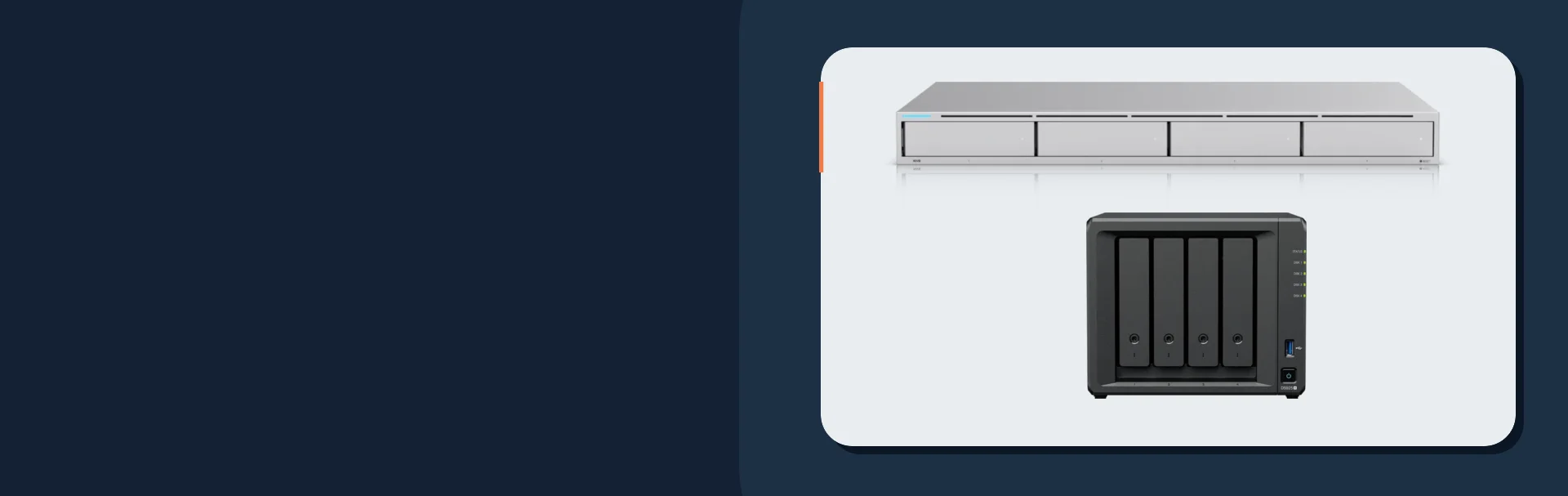
The Ubiquiti UniFi Network Video Recorder (UNVR) remains the clean NVR pick when the job is local-first recording inside a UniFi deployment. It is still one of the simplest ways to keep footage local and predictable for a single site.
The Synology DiskStation DS925+ is the current 2026 NAS reference point when the storage platform also needs backup, archive, replication, or mixed-vendor surveillance flexibility. It is the right type of hardware when the owner wants more than a dedicated recorder.
The WD Purple 8TB Surveillance Hard Drive remains a credible surveillance-class drive reference. WD's data sheet rates most WD Purple capacities at 180 TB/year of workload and some larger 7200 RPM models at 360 TB/year. That matters when the system writes video all day instead of acting like a light-duty file share.
For broader camera-and-access package planning, see security camera and access control packages that hold up.
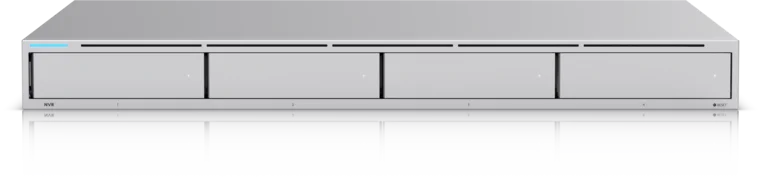
Four 2.5/3.5-inch drive bays for a UniFi Protect recorder
- 4 drive bays
- 10G SFP+ uplink
- UniFi Protect
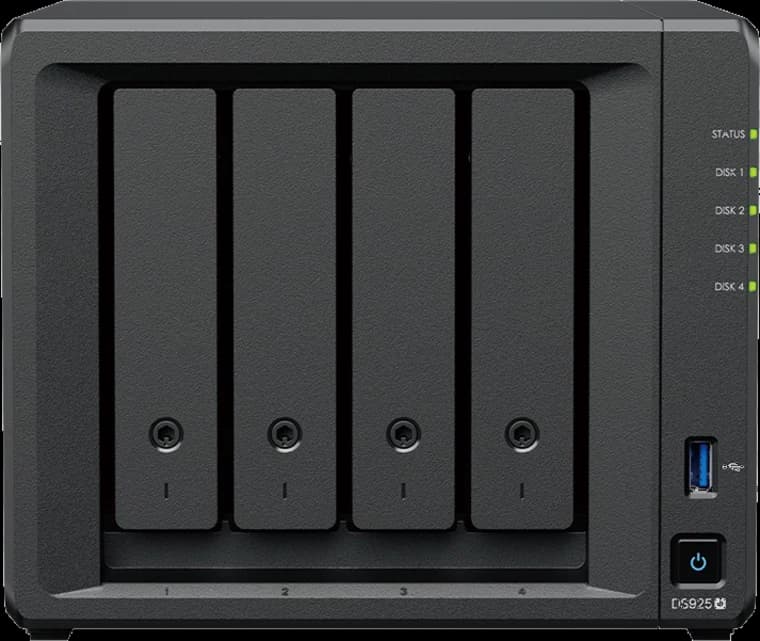
Synology
Synology DiskStation DS925+
A four-bay DSM system for growing shared files and multi-client backup.
- 4 drive bays
- 2 × 2.5GbE
- 2 M.2 slots
Storage choice checklist
- Pick NVR for single-site local recording with the lowest operational friction.
- Pick NAS when surveillance storage must also support archive, backup, or mixed-brand flexibility.
- Pick cloud when off-site resilience and centralized multi-site access matter most.
- Pick hybrid when local continuity and off-site survivability are both requirements.
- Size upload bandwidth before approving any cloud-first design.
- Model three-year cost before assuming a subscription is cheaper than hardware.
- Confirm whether policy, insurer, or compliance rules require local control or defined data residency.
- Protect any local recorder or NAS with a UPS and document the export workflow; use the [network outage resilience guide](/blog/home-network-internet-camera-voip-outage-backup) for load planning.
FAQ
Is an NVR or a NAS better for security cameras?
An NVR is better for simpler single-site camera systems. A NAS is better when the storage platform also needs backup, archive, or mixed-brand camera flexibility.
Is cloud storage better than local storage for security cameras?
Cloud is better for off-site resilience and centralized remote access. Local storage is better for predictable continuous recording, lower recurring cost, and surviving internet outages.
Can a NAS replace an NVR?
Yes. A NAS running surveillance software can replace a dedicated recorder, but it usually requires more deliberate storage, backup, and administration planning.
What is the best storage option for a small business camera system?
For a typical single-site small business, a dedicated NVR is still a common default. Move toward NAS or hybrid when archive flexibility, mixed brands, or off-site survivability become more important.
What is the safest camera storage design overall?
Hybrid is often the most resilient overall design. It keeps local recording available during internet outages and preserves a remote copy if the local hardware is stolen or damaged.
References
- Ubiquiti Help Center: How UniFi Protect Protects Your Data. Checked October 19, 2026.
- Synology Press Release: DiskStation DS925+ and DX525. Checked October 19, 2026.
- Synology Knowledge Center: C2 Backup for Surveillance end of life. Checked October 19, 2026.
- Axis: AXIS Camera Station Cloud Storage. Checked October 19, 2026.
- Western Digital: WD Purple data sheet. Checked October 19, 2026.
If you need to compare NVR, NAS, cloud, and hybrid storage against a real building and retention target, plan a security-surveillance project. The right answer shows up when bandwidth, failure modes, and policy are mapped before the hardware list is finalized.
Plan the project with a site visit
Confirm wiring, equipment, placement, and installation scope before hardware is locked in.