


- Quick summary
- What are the differences between Reolink recorders?
- What does the Reolink Home Hub do?
- What does the Reolink Home Hub Pro offer over the standard Hub?
- What is the Reolink Home Hub Mini?
- When should you choose a Reolink NVR instead of a Hub?
- How long does Reolink footage last on each storage path?
- How does the app experience differ between Hub and NVR?
- Do you need a UPS for a Reolink Hub or NVR?
- When is standalone microSD storage enough?
- How do you choose the right Reolink storage path?
- FAQ
- References
Quick summary
The Reolink Home Hub Pro is the best local storage path for most homeowners building a multi-camera Reolink system in 2026. It supports up to 24 cameras (with a maximum of 12 wired/PoE connections), includes a built-in 2TB hard drive expandable to 16TB, and keeps everything local without a monthly fee.
Buy the standard Reolink Home Hub if you have fewer than eight cameras and want the cheapest hub option. Buy the Home Hub Mini if you are running a small battery-camera kit and want the most compact form factor. Use an NVR when the system is large, PoE-first, and needs more storage depth than a hub provides. Skip all of them and stick with microSD if you only have one or two cameras.
- Best for most systems: Reolink Home Hub Pro — built-in 2TB HDD, up to 24 cameras (max 12 wired), Wi-Fi 6.
- Best budget hub: Reolink Home Hub — microSD storage, up to 8 cameras, smaller footprint.
- Best compact hub: Reolink Home Hub Mini — lightweight hub for small battery camera kits.
- Best for large PoE deployments: Reolink NVR — more storage bays, more PoE ports, more retention depth.
- Skip all recorders: microSD works fine for one or two cameras with short retention needs.
- Best Reolink cameras
- Reolink floodlight camera comparison
- NVR vs NAS vs cloud storage for camera footage
- Security camera system design guide
What are the differences between Reolink recorders?
The primary differences between the Reolink Home Hub, Home Hub Pro, and NVR are camera capacity, storage type, and whether the device includes integrated PoE ports.
| Storage path | Best for | Camera limit | Storage type | PoE ports | Typical price |
|---|---|---|---|---|---|
| Reolink Home Hub | Smaller systems on a budget | Up to 8 | Up to 2x microSD cards | None — cameras connect via Wi-Fi or your existing PoE switch | About $135 direct |
| Reolink Home Hub Pro | Most growing multi-camera systems | Up to 24 total (max 12 wired/PoE) | Built-in 2TB HDD, expandable to 16TB | None — cameras connect via Wi-Fi or your existing PoE switch | About $320 direct |
| Reolink Home Hub Mini | Compact battery camera kits | Up to 8 | microSD | None | Varies by bundle |
| Reolink NVR (e.g., RLN8-410, RLN16-410) | Large PoE-first deployments | 8 or 16 depending on model | Built-in HDD bay(s), typically 2TB-4TB | 8 or 16 integrated PoE ports | About $200-$400 depending on model and storage |
REOLINK
Reolink Home Hub
Best for smaller Reolink systems that want local encrypted storage without stepping up to a full 2TB hub.
Key details
- Supports up to 8 Reolink cameras with local storage and no mandatory monthly fee
- Uses up to two microSD cards instead of a built-in hard drive, keeping the hardware smaller and cheaper
- Supports current Reolink PoE, plug-in Wi-Fi, and many recent battery Wi-Fi cameras with the right firmware
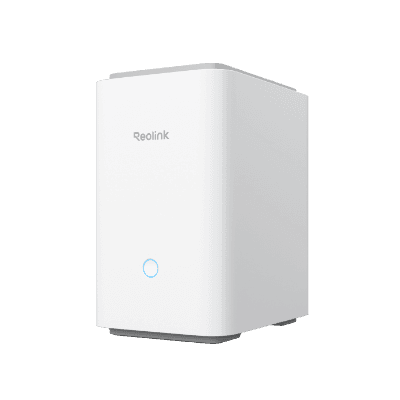
REOLINK
Reolink Home Hub Pro
Bring a growing Reolink camera system together with central local storage.
Before you buy: Confirm compatibility and recording modes for each camera.
Key details
- Built-in 2TB HDD with expansion support makes it the cleaner local-first upgrade over microSD-only workflows
- Supports up to 24 cameras, including up to 12 wired cameras, for households growing beyond a simple battery-camera setup
- Wi-Fi 6-ready hub with centralized playback, weekly summaries, and local encrypted storage
REOLINK
Reolink Home Hub Mini
Best for smaller camera counts when the buyer wants encrypted local storage in a compact hub, not a full recorder.
Key details
- Supports up to 8 cameras and up to 12MP live view and playback
- Uses microSD storage up to 1TB rather than a built-in hard drive
- A reasonable fit for smaller battery-camera setups, but not the strongest choice for longer 24/7 history
Best for 8+ PoE camera systems that need integrated power delivery and deep local storage in one device.
Key details
- 8 integrated PoE ports power and record wired cameras from a single device
- Built-in HDD bay supports large drives for weeks of continuous 4K retention
- One-box solution for all-PoE systems — no separate switch needed
What does the Reolink Home Hub do?
The Reolink Home Hub supports up to eight cameras and uses dual microSD cards (up to 1TB total) for local storage without a built-in hard drive. It is the entry point into centralized Reolink recording.
REOLINK
Reolink Home Hub
Best for smaller Reolink systems that want local encrypted storage without stepping up to a full 2TB hub.
Key details
- Supports up to 8 Reolink cameras with local storage and no mandatory monthly fee
- Uses up to two microSD cards instead of a built-in hard drive, keeping the hardware smaller and cheaper
- Supports current Reolink PoE, plug-in Wi-Fi, and many recent battery Wi-Fi cameras with the right firmware
Buy the Home Hub when:
- You have three to six cameras and do not plan to expand beyond eight.
- You want centralized playback and management without paying for a full NVR.
- Your cameras are a mix of Wi-Fi and battery models that do not need integrated PoE ports.
- You want local storage without a monthly fee, but do not need weeks of retention depth.
The main limitation is storage depth. MicroSD cards fill up faster than a hard drive when cameras record continuously or at high resolution. For most motion-triggered setups with a handful of cameras, this is fine. For longer retention or more cameras, the Home Hub Pro is the better path. The Home Hub does not include PoE ports — PoE cameras still need a separate switch.
What does the Reolink Home Hub Pro offer over the standard Hub?
The Reolink Home Hub Pro supports up to 24 cameras (max 12 wired/PoE), includes a built-in 2TB hard drive expandable to 16TB, and adds Wi-Fi 6 connectivity.
REOLINK
Reolink Home Hub Pro
Bring a growing Reolink camera system together with central local storage.
Before you buy: Confirm compatibility and recording modes for each camera.
Key details
- Built-in 2TB HDD with expansion support makes it the cleaner local-first upgrade over microSD-only workflows
- Supports up to 24 cameras, including up to 12 wired cameras, for households growing beyond a simple battery-camera setup
- Wi-Fi 6-ready hub with centralized playback, weekly summaries, and local encrypted storage
Buy the Home Hub Pro when:
- You have more than six cameras or plan to add more over time.
- You want weeks of local retention instead of days.
- You want a single device that handles recording for both Wi-Fi and PoE cameras across the property.
- You prefer a hard-drive-based recorder over microSD for reliability and capacity.
The Home Hub Pro is also the better choice when cameras record at higher resolutions or with continuous recording enabled. A 2TB hard drive provides more retention than a pair of microSD cards. The Home Hub Pro has a single SATA bay, so upgrading to a larger drive (up to 16TB) means replacing the factory 2TB drive, not adding a second one. Any standard 3.5-inch SATA HDD works — surveillance-rated drives like the Seagate SkyHawk are a common choice.
One constraint to plan around: while the Home Hub Pro accepts up to 24 cameras total, a maximum of 12 can be wired (PoE or plug-in) connections. The remaining slots are for battery/Wi-Fi cameras. If you are planning a 16-camera all-PoE system, the Home Hub Pro cannot accommodate it — an NVR is the right path instead.
Like the standard Home Hub, the Pro does not include PoE ports. PoE cameras still need a separate switch. The Pro is a recorder and management hub, not a PoE injector.
On the network side, the Home Hub Pro connects to your router or switch via a single 100 Mbps Ethernet port and manages Wi-Fi cameras through its own built-in Wi-Fi 6 radio. PoE cameras route through your existing network switch back to the hub. In practice, this means the hub works best on the same LAN segment as the cameras. For larger properties with multiple switches or VLANs, make sure the hub and all cameras can reach each other on the same network path — the hub does not manage routing or discovery across subnets on its own.
For most Reolink buyers building a system with four to twelve cameras across a house and yard, the Home Hub Pro is the right default choice. It costs more than the standard Hub, but the storage and capacity headroom make it a better long-term fit.
What is the Reolink Home Hub Mini?
The Reolink Home Hub Mini supports up to eight cameras using a single microSD card (up to 1TB) and is the most compact hub in the lineup.
REOLINK
Reolink Home Hub Mini
Best for smaller camera counts when the buyer wants encrypted local storage in a compact hub, not a full recorder.
Key details
- Supports up to 8 cameras and up to 12MP live view and playback
- Uses microSD storage up to 1TB rather than a built-in hard drive
- A reasonable fit for smaller battery-camera setups, but not the strongest choice for longer 24/7 history
Buy the Hub Mini when:
- You have two to four battery cameras and want a compact central hub.
- You bought a Reolink camera bundle that includes a Hub Mini.
- You do not need long retention or a hard drive.
The Hub Mini is not a step up from the Home Hub — it is a lighter alternative for smaller battery-camera kits. If you need more camera capacity, longer retention, or hard drive storage, go to the Home Hub or Home Hub Pro instead.
When should you choose a Reolink NVR instead of a Hub?
Reolink NVRs (like the RLN8-410 and RLN16-410) support 8 to 16 cameras and include integrated PoE ports to power wired cameras directly from the recorder.
Best for 8+ PoE camera systems that need integrated power delivery and deep local storage in one device.
Key details
- 8 integrated PoE ports power and record wired cameras from a single device
- Built-in HDD bay supports large drives for weeks of continuous 4K retention
- One-box solution for all-PoE systems — no separate switch needed
An NVR is the better choice when:
- You have eight to sixteen PoE cameras and want a single device that powers and records all of them.
- You need more than 2TB of storage and want the option to install a larger hard drive.
- The system is wired end-to-end and you want the recorder to manage the PoE ports directly.
- You are building a system where uptime and retention depth are more important than size or simplicity.
The main advantage of an NVR over a hub is integration. A Reolink NVR powers the PoE cameras, records the footage, and manages retention in one device. That means fewer components in the network closet and a simpler power path.
The main disadvantage is flexibility. Reolink NVRs are designed for wired PoE cameras. If the system includes a mix of Wi-Fi, battery, and PoE cameras, the hub path is usually more practical. The Home Hub Pro in particular handles mixed-camera systems better than a PoE-only NVR. If you are using a Hub instead of an NVR and your PoE cameras need a separate switch, the best low-cost PoE switches guide covers practical options.
For a deeper dive on the differences between NVR, NAS, and cloud-based recording, the NVR vs NAS vs cloud storage guide covers the tradeoffs more broadly.
How long does Reolink footage last on each storage path?
Retention depends on the number of cameras, recording resolution, bit rate, and whether recording is continuous or motion-triggered. Here are practical estimates:
| Storage path | Storage capacity | 4 cameras, motion-triggered | 4 cameras, 4K continuous 24/7 | 8 cameras, 4K continuous 24/7 |
|---|---|---|---|---|
| Home Hub (microSD) | Up to 1TB total (2x 512GB) | Several weeks | 2-3 days | 1-2 days |
| Home Hub Pro (HDD) | 2TB (expandable to 16TB) | Several months | 6-8 days | 3-4 days |
| Home Hub Pro (16TB upgrade) | 16TB | Many months | About 7-8 weeks | About 4 weeks |
| NVR (e.g., 4TB) | 4TB | Several months | About 2 weeks | About 1 week |
These are rough estimates based on typical Reolink 4K bit rates (6-8 Mbps per stream). Actual retention varies by camera model, compression settings, and scene complexity. Motion-triggered recording stores far less data per day than continuous recording, which is why the gap between the two modes is so large.
For systems that need weeks of continuous 4K footage from multiple cameras, upgrading the Home Hub Pro's drive to 8TB or 16TB or choosing an NVR with a larger drive bay is the practical path.
How does the app experience differ between Hub and NVR?
The Reolink App works with both Hubs and NVRs, but the playback experience is slightly different. The Home Hub and Home Hub Pro support Reolink's newer Security Summary feature, which organizes motion events chronologically and provides daily and weekly trend reports. This makes it easier to scan through a full day of activity without scrubbing through a timeline manually.
Reolink NVRs are catching up with similar event history features, but as of mid-2026, the Hub-based experience offers a cleaner event-browsing workflow through the app. Both paths support live view, playback, and push notifications through the same Reolink App — the difference is in how events are organized and presented.
Do you need a UPS for a Reolink Hub or NVR?
A centralized recorder is a single point of failure during a power outage. If the Home Hub Pro or NVR loses power, recording stops for every camera on the system — even if the cameras themselves stay powered by a separate PoE switch with its own battery backup.
For most homes, a small UPS rated at 600-1500VA is enough to keep a hub or NVR recording through a typical short outage (30 minutes to a few hours depending on draw). The total power draw of a Home Hub Pro is modest — well under 30W — so even an entry-level UPS provides meaningful runtime.
A few practical guidelines:
- Put the hub or NVR and the PoE switch (if separate) on the same UPS so the entire recording path survives together.
- If the system includes Wi-Fi cameras, the Wi-Fi access point also needs to stay powered for those cameras to continue streaming to the hub.
- Battery-powered cameras with onboard microSD are the most resilient during outages, since they record independently. But they also hold less footage and lack centralized playback.
A UPS does not make a home camera system enterprise-grade, but it prevents the most common gap: losing footage during the exact moment power-related events (storms, break-ins during outages) are most likely to matter.
When is standalone microSD storage enough?
Standalone microSD storage works for systems with one or two cameras that do not need centralized playback or long-term retention.
MicroSD works well when:
- You have one camera on a porch, driveway, or gate.
- You mostly check clips from the Reolink app when you get an alert.
- You do not need weeks of footage — a few days of motion-triggered clips is enough.
- You do not want to manage a separate recorder device.
The limitation is that each camera's footage lives on its own card. There is no central timeline, no unified search, and no redundancy. If the camera is stolen or damaged, the footage on the card goes with it. A hub or NVR adds centralized storage that survives individual camera loss.
For anyone with three or more cameras, the Home Hub or Home Hub Pro is a better answer. The cost is modest, and the centralized playback alone usually justifies the upgrade.
How do you choose the right Reolink storage path?
Select your Reolink storage based on total camera count, required retention time, and whether you use wired PoE or wireless cameras.
| Your situation | Best storage path | Why |
|---|---|---|
| One or two cameras, short retention needs | microSD only | Simplest setup, no extra hardware |
| Three to six cameras, mostly Wi-Fi or battery | Reolink Home Hub | Centralized playback without the cost of a full hub |
| Small battery camera kit, want compact hub | Reolink Home Hub Mini | Lightest hub, often bundled with cameras |
| Four to twelve cameras, mixed types, want room to grow | Reolink Home Hub Pro | Built-in 2TB HDD, up to 24 cameras (max 12 wired), best default for most systems |
| Eight to sixteen PoE cameras, wired end-to-end | Reolink NVR | Integrated PoE ports, deeper storage, one-box wired solution |
If you are building a camera system from scratch, start with the camera layout first. The security camera system design guide covers how to plan camera positions, coverage zones, and power paths before choosing a recorder.
If you already know you want Reolink cameras, the best Reolink cameras guide covers the current lineup and which models fit which jobs. For front-door coverage specifically, the Reolink Video Doorbell PoE vs WiFi comparison covers which doorbell model works with each recorder path.
For homeowners in Westchester or Fairfield County who want a designed and installed system, our security surveillance services and Reolink installation page cover what a professional install includes.
FAQ
Does the Reolink Home Hub require a monthly subscription?
No. The Reolink Home Hub, Home Hub Pro, and Home Hub Mini all record locally without a mandatory monthly fee. Optional Reolink Cloud is available in some regions, but it is not required.
Can the Reolink Home Hub Pro work with PoE cameras?
Yes. The Home Hub Pro can manage and record footage from up to 12 wired/PoE cameras (out of its 24-camera total), but it does not supply PoE power directly. PoE cameras still need a separate PoE switch or PoE injector. If you need more than 12 wired cameras, an NVR is the better fit.
How long does footage last on the Reolink Home Hub Pro?
A 2TB drive with four cameras recording motion-triggered clips at 4K holds several months of footage. With four cameras recording continuously at 4K (6-8 Mbps per stream), the same 2TB drive holds roughly 6-8 days before overwriting. Upgrading to a 16TB drive extends continuous 4K retention from four cameras to roughly 7-8 weeks. See the retention estimates table above for more scenarios.
Is the Reolink Home Hub the same as an NVR?
Not exactly. A Reolink NVR includes integrated PoE ports and is designed primarily for wired PoE cameras. The Home Hub and Home Hub Pro are more flexible hubs that manage Wi-Fi, battery, and PoE cameras without providing PoE power directly. The hub path is better for mixed-camera systems; the NVR path is better for all-PoE wired deployments.
Can I use a Reolink Home Hub and an NVR at the same time?
Reolink's current documentation shows the Home Hub and NVR as separate recording paths. For most homeowners, picking one path is simpler than trying to run both. If the system is large enough to need both, it may be worth considering whether the NVR alone can handle the full load.
Which Reolink Home Hub should I buy for a new house?
For a new house with plans for four or more cameras, the Reolink Home Hub Pro is the safest default. The built-in 2TB hard drive and 24-camera capacity give enough room for the system to grow as you add cameras after move-in. If your cameras are all PoE and you want integrated power delivery, consider an NVR instead.
References
- Reolink Home Hub official product page — checked May 13, 2026
- Reolink Home Hub Pro official product page — checked May 13, 2026
- Reolink Home Hub Mini official product page — checked May 13, 2026
- Introduction to Reolink Home Hub Series — checked May 13, 2026
- Reolink Home Hub Compatibility — checked May 13, 2026
Plan the project with a site visit
Confirm wiring, equipment, placement, and installation scope before hardware is locked in.