

- Quick summary
- What Are the Best 8-Port PoE Switches for 2026?
- What PoE Standards Matter in 2026?
- How Do You Choose the Right Budget PoE Switch?
- What Is the Best PoE Switch for Cameras?
- What Is the Best Cheap PoE Switch for Access Points?
- How to Calculate PoE Switch Power Budgets
- What PoE Switch Fits Common Home and Small Office Layouts?
- Should You Buy a PoE Switch or PoE Injectors?
- When Should You Move From Unmanaged to Managed?
- What Mistakes Cause Budget PoE Switch Problems?
- FAQs
- References
- Disclosure
Quick summary
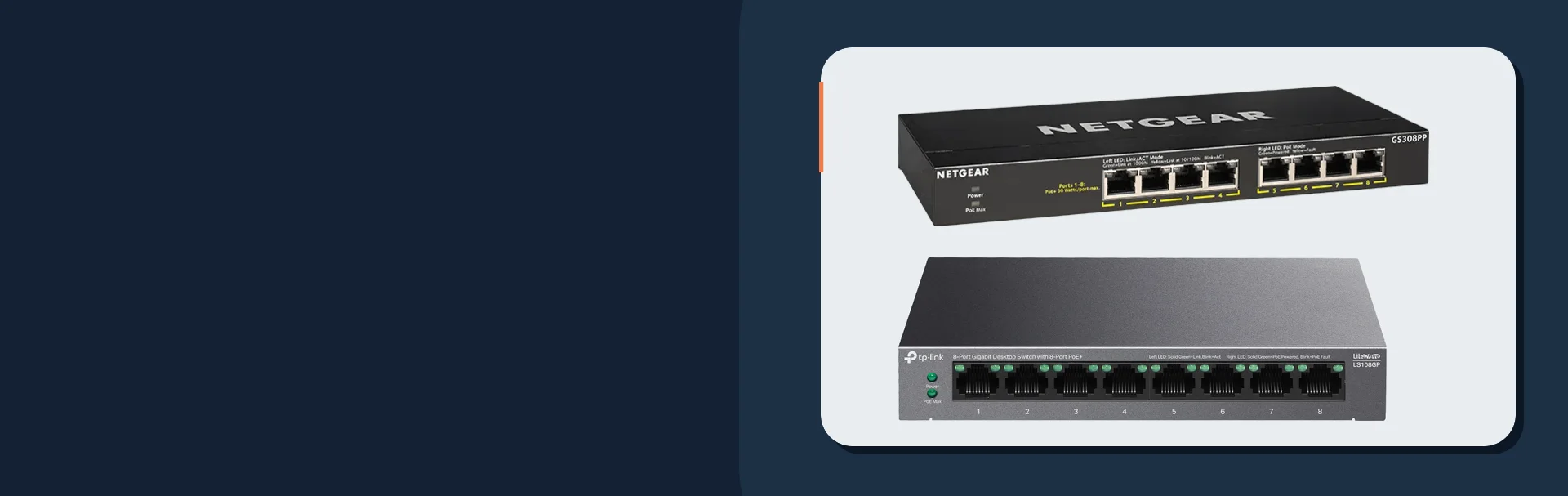
The best low-cost PoE switches for cameras and access points in June 2026 are the NETGEAR GS308PP, TP-Link LS108GP, NETGEAR GS108PP, TP-Link TL-SG1008MP, and Ubiquiti USW-Lite-8-PoE.
For most buyers, the NETGEAR GS308PP is the safest mixed camera-and-AP pick, the TP-Link LS108GP is the best strict-budget option, the NETGEAR GS108PP is the right step-up when you need more power headroom, the TP-Link TL-SG1008MP is the camera-heavy value pick when fan noise is acceptable, and the Ubiquiti USW-Lite-8-PoE is the best low-cost managed switch if you already run UniFi.
Most homes and small offices should size by total PoE wattage, not by port count. A quiet 60W switch can be perfect for two APs and a couple of cameras, while a 120W switch is the safer answer once night IR loads, door hardware, or growth are in play.
- Networking & Infrastructure services
- Wi-Fi design: right-size access points
- Small office Wi-Fi AP density plan
- 2.5GbE PoE switches for Wi-Fi 7 APs and cameras
NETGEAR
NETGEAR GS308PP
A fanless all-rounder for mixed camera and access-point installations.
Before you buy: A higher power budget requires the appropriate optional power supply.
Key details
- 8 x 802.3af/at PoE+ ports with 83W total budget
- Fanless gigabit switch for mixed AP and camera layouts
- FlexPoE support allows expansion to a higher budget with the optional PSU

TP-Link
TP-Link LS108GP
A quiet, fanless option for a small mix of cameras and access points.
Before you buy: Check that the combined PoE load fits the 62W budget.
Key details
- 8 x 802.3af/at PoE+ ports with 62W total budget
- Fanless design with PoE Auto Recovery for APs and cameras
- Strong low-cost fit for quiet rooms and lighter endpoint counts
NETGEAR
NETGEAR GS108PP
Extra power headroom for camera-heavy jobs and future expansion.
Before you buy: Add up the maximum draw of all planned PoE devices.
Key details
- 8 x 802.3af/at PoE+ ports with 123W total budget
- Better headroom for camera-heavy jobs and future growth
- Limited lifetime hardware warranty is the biggest support advantage here
Ubiquiti
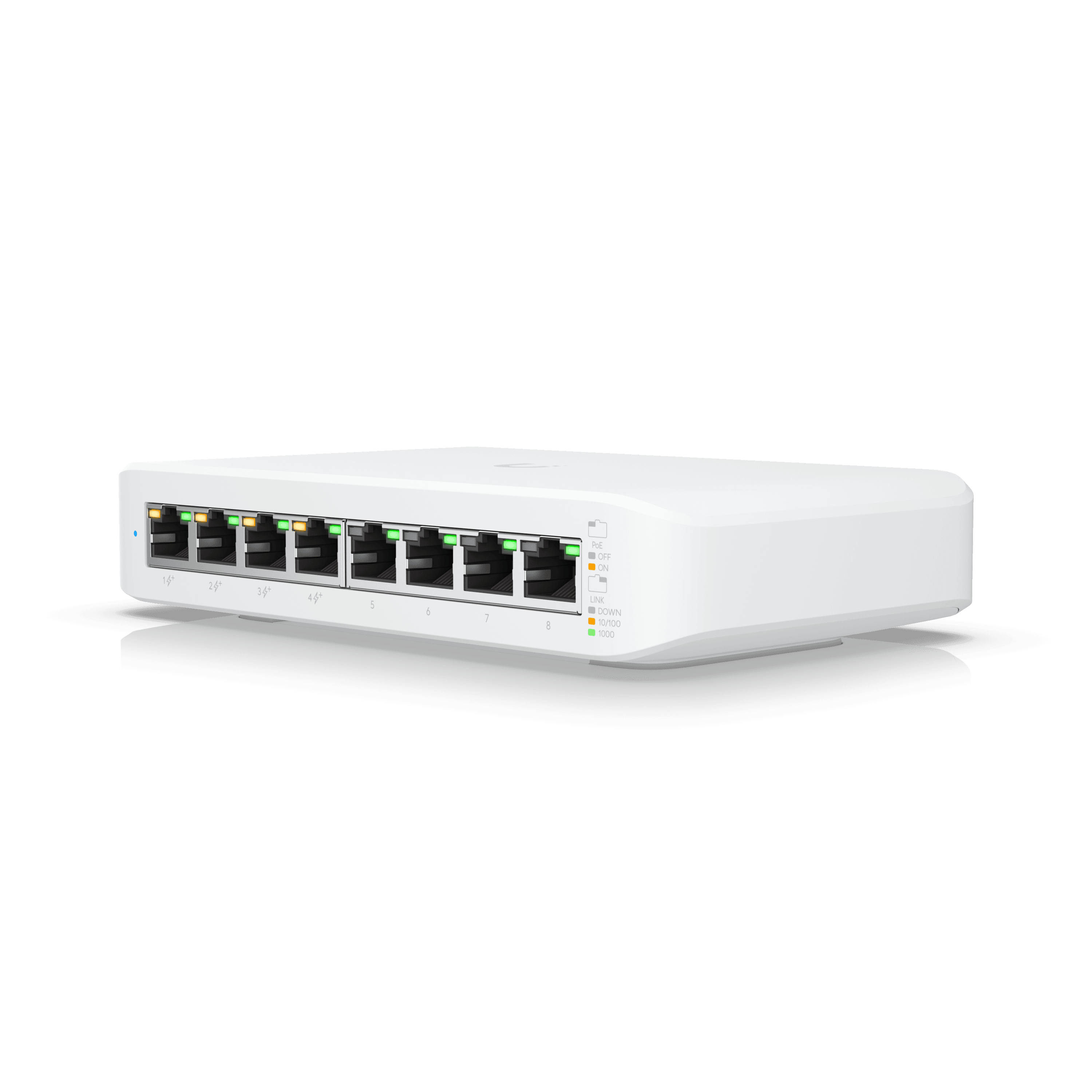
Ubiquiti USW-Lite-8-PoE
A compact managed switch for an existing UniFi network.
Before you buy: Only four of its eight ports supply PoE. No seller-specific Amazon offer was verified, so this card opens Ubiquiti.
Key details
- Fanless UniFi-managed switch with 4 PoE+ ports and 52W total PoE
- Strong fit when VLANs and controller visibility matter more than raw PoE volume
- Best low-cost managed choice for existing UniFi sites
What Are the Best 8-Port PoE Switches for 2026?
The best 8-port budget PoE switches are the NETGEAR GS308PP for cameras, TP-Link LS108GP for low cost, NETGEAR GS108PP for headroom, and Ubiquiti USW-Lite-8-PoE for UniFi.
| Model | PoE ports | Total PoE budget | Management | Noise | Warranty | Idle draw | Price signal | Best fit |
|---|---|---|---|---|---|---|---|---|
| TP-Link LS108GP | 8 | 62W | Unmanaged | Fanless | 3-year limited warranty in the US for LiteWave steel-chassis switches | 5.53W with no PD connected | Commonly around the $60 strict-budget tier; re-check live offers | The best strict-budget pick for APs plus a light camera mix |
| NETGEAR GS308PP | 8 | 83W, upgradable to 123W | Unmanaged | Fanless | NETGEAR limited lifetime hardware warranty on the current official page | Not published on the current product page | $84.99 direct from NETGEAR on June 22, 2026; $129.99 shown as original price | The best value for mixed camera-and-AP layouts |
| NETGEAR GS108PP | 8 | 123W | Unmanaged | Quiet fan | Limited lifetime hardware warranty with optional business support/RMA coverage | Not published on the current product page | Usually a low-$130 to $140-class step-up; re-check live offers | The safest low-cost choice when camera count may grow |
| TP-Link TL-SG1008MP | 8 | 153W on current TP-Link US page; older retailer copy may show lower regional/revision figures | Unmanaged | Fan-cooled | TP-Link warranty page lists non-Omada steel-chassis switches at 3 years in the US | Not published on the current product page | Usually a low-$130 to $140-class step-up; re-check live offers | The best budget step-up for camera-heavy closets where fan noise is acceptable |
| Ubiquiti USW-Lite-8-PoE | 4 PoE+ ports of 8 total | 52W | Managed in UniFi | Fanless | 2 years if bought direct from UI Store, 1 year through authorized distribution | 8W excluding PoE output | $109.00 direct from the UI Store on June 22, 2026 | The best low-cost managed option for UniFi sites |
Three details matter here. First, the GS308PP is a better live value when it is discounted, but it should still be sized as an 83W switch unless you buy the optional higher-power supply. Second, the Ubiquiti model is not a true eight-port PoE switch; it has eight Ethernet ports, but only four provide PoE+. Third, the TL-SG1008MP is a strong power-budget value, but it belongs in a closet, rack, or utility space where fan noise is acceptable.
If you are tempted by generic 120W marketplace switches, treat them as a support tradeoff instead of a bargain. They can work, but they usually do not match the warranty clarity, thermal documentation, or field support of the models above.
What PoE Standards Matter in 2026?
802.3af delivers 15.4W, 802.3at delivers 30W, and 802.3bt matters when newer APs or specialty endpoints exceed PoE+.
For most camera and Wi-Fi jobs, standard PoE and PoE+ are still enough. Typical fixed cameras fit comfortably inside 802.3af or 802.3at, and many Wi-Fi 6 and Wi-Fi 7 access points still ship as PoE+ devices rather than PoE++ devices.
The planning problem is not the standard label by itself. The real problem is cumulative draw across the whole switch. Four 25W-class Wi-Fi 7 access points can stay inside PoE+, but they can still overwhelm a 52W or 62W switch even though each port is technically compatible.
Current Wi-Fi 7 APs like the Ubiquiti U7 Pro Max and TP-Link Omada EAP773 still fit inside PoE+, but both sit near the top of the 30W class. Higher-end Wi-Fi 7 designs and future multi-radio gear can move into PoE++ territory, so do not buy a tiny PoE budget if your AP refresh is next.
How Do You Choose the Right Budget PoE Switch?
Calculate your total required PoE wattage, add 25% for power spikes, and select a fanless switch that supports the 802.3at (PoE+) standard.
Port count and power capacity are separate decisions. Two eight-port switches can advertise the same port count while landing in completely different real-world tiers once cameras, APs, and future adds are counted honestly.
PoE budget: Add every endpoint at maximum published draw, not average draw.Headroom: Keep about 25% spare capacity for IR camera spikes, cold starts, firmware events, and later expansion.Noise: Prefer fanless models in living spaces, home offices, and quiet closets.Recovery features: PoE auto recovery is valuable for cameras and APs that occasionally lock up.Warranty: Cheap hardware gets expensive fast when replacement coverage is vague.Management: Stay unmanaged when the site is simple; move to managed when VLANs, port visibility, and remote troubleshooting matter.
Do not assume every "8-port PoE" unit can power eight hungry devices at once. The LS108GP can be excellent at 62W, but it is the wrong tool for an eight-camera layout or a Wi-Fi 7 refresh with multiple 25W-class APs.
What Is the Best PoE Switch for Cameras?
The GS308PP is the best low-cost camera switch for most small deployments, and the GS108PP is the safer step-up when growth is likely.
The GS308PP hits the sweet spot for common small surveillance layouts because 83W covers a realistic mix like two APs plus four to six low-draw cameras with better safety margin than a 60W-class switch. It also stays fanless, which matters when the switch lands in a retail back office, utility room, or home network nook instead of a dedicated rack room.
Move to the GS108PP when the job is camera-heavy, when door hardware shares the same switch, or when night performance matters. Camera systems can look fine during daytime testing and then fail after dark when IR illumination and heater loads show up. That is where the 123W class earns its keep.
If the deployment is mostly cameras and almost no management logic is needed, unmanaged usually stays the right answer. Save managed switching for sites that also need VLAN separation, remote port control, or broader UniFi visibility.
If you need more power per dollar and the switch can live in a closet instead of a quiet room, the TP-Link TL-SG1008MP deserves a serious look. Its current TP-Link US page lists a 153W budget, which is materially higher than the fanless low-cost tier, but the tradeoff is a larger desktop or rack footprint and active cooling.
| Camera/AP mix | Typical planned PoE load | Minimum comfortable switch tier | Recommended pick |
|---|---|---|---|
| 2-4 fixed cameras only | 20-40W before headroom | 60W class | TP-Link LS108GP or NETGEAR GS308LP |
| 4 fixed cameras + 1 AP | 50-65W before headroom | 83W class | NETGEAR GS308PP |
| 6 fixed cameras + 2 APs | 85-110W before headroom | 120W+ class | NETGEAR GS108PP or TP-Link TL-SG1008MP |
| 8 cameras, PTZs, door hardware, or growth expected | 120W+ before headroom | 153W+ or larger managed switch | TP-Link TL-SG1008MP or a larger managed PoE switch |
NETGEAR
NETGEAR GS308PP
A fanless all-rounder for mixed camera and access-point installations.
Before you buy: A higher power budget requires the appropriate optional power supply.
Key details
- 8 x 802.3af/at PoE+ ports with 83W total budget
- Fanless gigabit switch for mixed AP and camera layouts
- FlexPoE support allows expansion to a higher budget with the optional PSU
NETGEAR
NETGEAR GS108PP
Extra power headroom for camera-heavy jobs and future expansion.
Before you buy: Add up the maximum draw of all planned PoE devices.
Key details
- 8 x 802.3af/at PoE+ ports with 123W total budget
- Better headroom for camera-heavy jobs and future growth
- Limited lifetime hardware warranty is the biggest support advantage here
-2.0_01_large_1578383114314o.png&w=3840&q=75)
TP-Link
TP-Link TL-SG1008MP
More PoE headroom for camera-heavy installations in a utility closet.
Before you buy: Check the hardware revision and power budget before ordering.
Key details
- 8 x 802.3af/at PoE+ ports with a 153W total power budget
- Better fit than fanless 60W-class switches once camera counts climb
- Strong value when the switch can live in a closet instead of a quiet room
What Is the Best Cheap PoE Switch for Access Points?
The LS108GP is the best cheap AP-first switch, while the USW-Lite-8-PoE is the better low-cost choice inside UniFi.
The LS108GP is strong when you want standard 802.3af/at power, silent operation, and the lowest real entry price without moving into dubious marketplace hardware. It is a practical answer for two or three access points plus one or two low-draw cameras, and TP-Link's published idle draw is helpful when the site is sensitive to standby power.
Choose the USW-Lite-8-PoE when controller visibility matters more than raw PoE capacity. It gives you UniFi management, VLAN control, and a clean fanless footprint, but it only has four PoE+ ports and a 52W total budget, so it is easy to outgrow if you treat it like a full eight-port PoE camera switch.
If you find the NETGEAR GS308LP near current sale pricing, it is the other credible ultra-budget option for light loads. It is not better than the LS108GP on raw features, but it is relevant when you want a fanless eight-port PoE+ switch from a mainstream vendor and can catch it near the lower end of the 60W switch tier.
For non-UniFi AP deployments, unmanaged usually wins on value until you actually need segmentation or remote diagnostics. Paying for management you will not use is not the same thing as future-proofing.
Here is a practical AP example. Three Wi-Fi 7 APs at 21W each equal 63W before cameras or phones. Add 25% headroom and the target becomes roughly 79W, which puts a 62W switch out of range and makes an 83W switch the bare minimum. If the same closet also powers cameras, jump to the 120W or 153W class instead of trying to run the switch at the edge.
TP-Link
TP-Link LS108GP
A quiet, fanless option for a small mix of cameras and access points.
Before you buy: Check that the combined PoE load fits the 62W budget.
Key details
- 8 x 802.3af/at PoE+ ports with 62W total budget
- Fanless design with PoE Auto Recovery for APs and cameras
- Strong low-cost fit for quiet rooms and lighter endpoint counts
NETGEAR
NETGEAR GS308LP
A quiet option for lighter PoE loads, with a power-supply upgrade path.
Before you buy: Start with the included power supply’s budget, not the upgrade maximum.
Key details
- 8 x 802.3af/at PoE+ ports with 60W total budget
- Fanless low-cost alternative when the load is lighter than the GS308PP tier
- FlexPoE path makes it useful when you may upgrade later
Ubiquiti
Ubiquiti USW-Lite-8-PoE
A compact managed switch for an existing UniFi network.
Before you buy: Only four of its eight ports supply PoE. No seller-specific Amazon offer was verified, so this card opens Ubiquiti.
Key details
- Fanless UniFi-managed switch with 4 PoE+ ports and 52W total PoE
- Strong fit when VLANs and controller visibility matter more than raw PoE volume
- Best low-cost managed choice for existing UniFi sites
How to Calculate PoE Switch Power Budgets
Add the maximum wattage of every powered device on your network and multiply by 1.25 to guarantee enough headroom for power spikes and future growth.
- 1List every powered device on the switch, including APs, cameras, intercoms, door stations, and future day-one additions.
- 2Use each device's published maximum PoE draw from the data sheet.
- 3Add the maximum values together for your real planned load.
- 4Multiply that total by 1.25 to preserve 25% headroom.
- 5Buy the next switch tier up if your result lands close to the advertised switch limit.
Example: two access points at 16W each plus four cameras at 10W each equals 72W. Multiply by 1.25 and the target becomes 90W. An 83W switch is now undersized on paper, so a 120W-class switch is the correct buy.
This is why "average power draw" advice causes rework. Cameras change behavior at night, APs draw more during upgrades and higher radio activity, and one future endpoint can erase the tiny savings from buying the smaller switch first.
What PoE Switch Fits Common Home and Small Office Layouts?
An 83W switch fits most mixed AP-and-camera installs, while 120W becomes safer once you move past six powered endpoints or add higher-draw gear.
| Layout | Endpoint mix | Safer switch tier | Why |
|---|---|---|---|
| 2-story home | 2 APs + 3 cameras | 83W | Leaves margin for one more endpoint without living at the edge |
| Small office | 3 APs + 4 cameras | 120W | AP and camera peaks can push past the 83W comfort zone |
| Retail edge closet | 2 APs + 6 cameras + door hardware | 120W or higher | Night IR and access-control events stack power demand |
| UniFi-first branch office | 2 APs + 2 cameras with VLANs | USW-Lite-8-PoE | Works well if four PoE ports and 52W total are enough |
We can size the switch, verify PoE headroom, place the hardware cleanly, and hand over a labeled network before you buy the wrong power tier.
Older buildings punish weak planning. Long runs, bad terminations, and overloaded power budgets create failures that look random until you do the wattage math and clean up the closet.
Should You Buy a PoE Switch or PoE Injectors?
Use a PoE switch for three or more devices to centralize power and reduce cable clutter, but use PoE injectors for isolated, single-device runs.
Injectors make sense when there is no practical switch location or when one remote AP or camera needs power without dragging a whole switch into the design. They are also fine as a temporary fix when the permanent rack upgrade is scheduled later.
Beyond two devices, a PoE switch is operationally better. It reduces wall adapters, simplifies UPS coverage, keeps labeling clean, and gives you one predictable place to troubleshoot power and data together.
For small offices, include the PoE switch in the internet resilience plan so phones, APs, cameras, and critical devices behave predictably during failover or short power events.
When Should You Move From Unmanaged to Managed?
Managed switching becomes worth the cost when segmentation, visibility, and remote control matter more than raw port count.
Stay unmanaged when the goal is simple and stable power plus data. Move to managed when the site needs camera VLANs, guest isolation, port-level diagnostics, controller visibility, or remote changes without a truck roll.
The Ubiquiti USW-Lite-8-PoE exists exactly on that boundary. It is not the strongest PoE budget in this roundup, but it is a good answer when low-cost management matters more than maximum powered-port count.
What Mistakes Cause Budget PoE Switch Problems?
Most budget PoE failures come from power budgeting mistakes, not from bad switching silicon.
- Buying by port count only and ignoring total PoE budget
- Treating list-price or sale-price snapshots as stable pricing
- Running too close to 100% of switch budget from day one
- Assuming all eight ports can power eight high-draw endpoints comfortably
- Forgetting that UniFi Lite 8 PoE only has four PoE+ ports
- Skipping UPS and outage planning and blaming the switch for brief power events
- Choosing a generic marketplace switch without checking warranty, return path, and thermal behavior
Many budget PoE switches are fanless, but higher-power models often use low-noise fans instead. If the switch will live near desks or bedrooms, verify acoustics before you buy.
FAQs
Is a cheap PoE switch safe for business use?
Yes, if you stay inside honest PoE limits and buy from a vendor with clear warranty terms. Small offices often do very well with unmanaged PoE+ switches from NETGEAR or TP-Link.
How much headroom should a PoE switch have?
Plan roughly 25% above worst-case device draw. That margin protects against night camera load, boot spikes, and near-term growth.
Do I need PoE++ for Wi-Fi 7?
Not always. Many current Wi-Fi 7 APs still run on PoE+, but they sit close to the 30W class and can overwhelm small total switch budgets fast.
Is the Ubiquiti USW-Lite-8-PoE an eight-port PoE switch?
It has eight Ethernet ports, but only four of them provide PoE+. That makes it a managed UniFi edge switch, not a full eight-port camera power box.
References
- TP-Link LS108GP official specs - checked June 22, 2026
- TP-Link TL-SG1008MP official specs - checked June 22, 2026
- NETGEAR GS308PP official page - checked June 22, 2026
- NETGEAR GS108PP official page - checked June 22, 2026
- Ubiquiti Store: USW-Lite-8-PoE - checked June 22, 2026
Disclosure
Disclosure: this article includes affiliate links. As an Amazon Associate, we earn from qualifying purchases. This does not increase your price.
Plan the wiring and Wi-Fi with a site visit
Walk the space with us to settle cable routes, rack location and access point placement before anything is installed.