

- Quick summary
- What Is Wi-Fi 7?
- What Are the Main Features of Wi-Fi 7?
- Do You Need Wi-Fi 7 for Your Current Devices?
- Wi-Fi 6E vs. Wi-Fi 7: Which Is the Better Value in 2026?
- Ethernet vs. Wireless Backhaul for Wi-Fi 7
- How Home Construction Impacts Wi-Fi 7 Signals
- What Speeds Should You Expect in Real Homes?
- When Should You Upgrade Now vs. Wait?
- Which Products Fit the Most Common Wi-Fi 7 Upgrade Paths?
- Common Wi-Fi 7 Upgrade Mistakes
- FAQs
- References
- Next steps
Quick summary
Wi-Fi 7 is worth upgrading to in 2026 when you have multi-gig internet, heavy local traffic, or several Wi-Fi 7 devices that can actually use 6 GHz well. If your internet is still under 1 Gbps and most of your devices are older phones, TVs, printers, and smart-home gear, a well-placed Wi-Fi 6E system is often the better value.
The bigger decision is usually not the radio standard. It is whether the home can support clean node placement and wired backhaul. In real installs, Ethernet first and MoCA 2.5 second usually matter more than buying the most expensive Wi-Fi 7 box.
- Best Wi-Fi 7 mesh systems (Updated 2026)
- Wi-Fi 7 speed tests and placement
- Wired vs. wireless: the right mix
- Networking quick wins
What Is Wi-Fi 7?
Wi-Fi 7 (802.11be) is the newest wireless networking standard designed to deliver much higher peak throughput, lower latency, and improved link reliability across the 2.4 GHz, 5 GHz, and 6 GHz bands.
That does not mean every home will feel dramatically faster overnight. Wi-Fi 7 delivers its best gains when four things line up at the same time: a compatible client device, access to 6 GHz, clean channel conditions, and a wired path behind the access point or mesh node that is fast enough to avoid becoming the bottleneck.
For most homeowners, the plain-English version is simple:
- Wi-Fi 7 can move more data than Wi-Fi 6E in the right room with the right client.
- Wi-Fi 7 can hold up better when multiple people are working, streaming, gaming, or moving files at once.
- Wi-Fi 7 does not fix weak placement, dense walls, or a poor backhaul path.
- Wi-Fi 7 is backward-compatible, so older devices still connect on 2.4 GHz and 5 GHz.
What Are the Main Features of Wi-Fi 7?
Wi-Fi 7 adds Multi-Link Operation, 320 MHz channels, and 4K-QAM to improve speed, latency, and reliability on supported devices.
- Multi-Link Operation (MLO): A supported client can move traffic across more than one link instead of waiting on one perfect band. In practice, that helps throughput stay steadier when one band gets crowded or weak.
- 320 MHz channels: On 6 GHz, Wi-Fi 7 can use channels twice as wide as Wi-Fi 6E. That is why same-room and next-room local speeds can jump on newer phones and laptops when the spectrum is clean.
- 4K-QAM: Wi-Fi 7 can pack more data into each transmission when the signal is strong and clean. The benefit drops fast with distance, walls, and noisy environments.
- Better spectrum use: Features like preamble puncturing and improved scheduling help supported gear use crowded air more efficiently instead of wasting an entire wide channel.
What MLO does not do is just as important:
- It does not replace proper node spacing.
- It does not turn a weak wireless backhaul into a wired one.
- It does not change how 6 GHz falls off in plaster, brick, and stone homes.
Do You Need Wi-Fi 7 for Your Current Devices?
You only need Wi-Fi 7 right now if your important devices already support it or you are buying new hardware that will stay in service for several years.
Start with the devices that define your day: work laptop, primary phone, gaming PC, and any machine that moves large local files. In early 2026, Wi-Fi 7 support is common on newer premium phones and laptops, including Apple's iPhone 16 family, iPhone 17 family, and most of Samsung's Galaxy S25 line. One useful nuance: Samsung's Galaxy S25 FE still tops out at Wi-Fi 6E, so "S25" does not automatically mean Wi-Fi 7 across the full family. That still does not mean the rest of the house is ready. Many TVs, printers, cameras, smart speakers, thermostats, and low-power smart-home devices still live on older 2.4 GHz or 5 GHz radios.
That split matters. If the only Wi-Fi 7 device in your home is one phone, the upgrade case is weak. If your work laptop, your phone, and a NAS-backed editing workflow all sit on the same network, Wi-Fi 7 can save real time and reduce congestion during busy hours. One more installer reality check belongs here: Apple's iPhone 17 family uses the N1 wireless chip and, per Apple's own deployment specs, supports Wi-Fi 7 at up to 160 MHz channel width rather than the standard's full 320 MHz ceiling. That is a good reminder not to buy a premium 320 MHz router expecting every flagship phone to use that specific feature to its fullest.
- Primary work laptop or desktop dock
- Main household phones, not just guest devices
- Gaming PCs or consoles with high-bandwidth updates
- Any NAS, media server, or local backup workflow
- The switch or router ports feeding the Wi-Fi node
Wi-Fi 6E vs. Wi-Fi 7: Which Is the Better Value in 2026?
Wi-Fi 6E is still the better value in 2026 when you want 6 GHz access without paying for Wi-Fi 7 features your current devices cannot use yet.
Wi-Fi 6E already gives you the clean 6 GHz band, which is often the single biggest practical upgrade over older Wi-Fi 5 or Wi-Fi 6 setups. For many 1 Gbps homes, that is enough. A well-placed Wi-Fi 6E system with wired backhaul can feel better day to day than a poorly placed Wi-Fi 7 mesh running wireless backhaul.
Choose Wi-Fi 6E when:
- Your internet service is still under 1 Gbps.
- Most of your daily devices are Wi-Fi 6 or 6E, not Wi-Fi 7.
- You want clean 6 GHz capacity but need to control budget.
- The price gap to a better-wired design matters more than the price gap to a newer badge.
Choose Wi-Fi 7 when:
- You already have or plan to add multi-gig internet.
- You move large files locally between a NAS, desktop, and newer laptops.
- You are buying for a longer refresh cycle and the price premium is modest.
- You can feed the nodes with Ethernet or MoCA 2.5 so the wireless side is not wasted.
A tuned Wi-Fi 6E network is still a serious network in 2026. The wrong Wi-Fi 7 design is worse than the right Wi-Fi 6E design.
Ethernet vs. Wireless Backhaul for Wi-Fi 7
Hardwired Ethernet backhaul is the most stable way to unlock Wi-Fi 7, and MoCA 2.5 is the best fallback when the home already has usable coax.
Backhaul is the connection between the main router and the other nodes or access points. When that path is wireless, your mesh has to spend airtime talking to itself before it can serve clients. When that path is wired, the node can spend its radio time serving devices instead of relaying traffic.
In practical terms, the order is:
- Ethernet backhaul
- MoCA 2.5 over existing coax
- Short wireless backhaul in easy, open layouts
If you can pull even one or two clean Cat6 or Cat6A runs, do that before spending extra on premium mesh hardware. If you cannot pull cable but the house has coax, a bonded MoCA 2.5 kit is usually the smartest retrofit. After a new run, test it before you start blaming Wi-Fi. A short shielded Cat6A patch cable is also a cheap place to avoid self-inflicted bottlenecks at the rack or wall plate.
- Wire the main node and the busiest secondary node first.
- Keep nodes visible and in open air, not behind TVs or in cabinets.
- Use 2.5 GbE uplinks where available if the goal is multi-gig local performance.
- Treat wireless backhaul as a compromise, not a premium feature.
How Home Construction Impacts Wi-Fi 7 Signals
Home construction changes Wi-Fi 7 results more than most marketing pages admit, especially in older Westchester homes with plaster, brick, stone, and awkward stair geometry.
Wi-Fi 7 depends heavily on 6 GHz for its biggest speed gains, and 6 GHz does not behave like magic. In newer drywall homes, it can perform very well across the next room or down an open hallway. In pre-war or heavily renovated homes with plaster-and-lath, masonry fireplaces, radiant barriers, or mirrored built-ins, 6 GHz drops faster and becomes less predictable.
That is why local layout matters:
- Older colonials and pre-war homes: Expect shorter 6 GHz reach, especially across stairwells, fireplaces, and thick interior walls. These homes often need wired nodes on each floor.
- Brick or stone sections: Do not plan to blast through them. Place a node on each side or use Ethernet or coax to bridge the gap.
- Modern drywall layouts: Wi-Fi 7 can carry farther, but open-plan homes still need careful spacing to keep 6 GHz useful beyond the same room.
- Finished basements and attic offices: These are classic weak spots because the stair path becomes the only clean geometry. A single moved node rarely fixes that without a wired assist.
In local installs, we usually get better results by shortening the path and wiring the problem area than by forcing 320 MHz across a difficult floor plan.
What Speeds Should You Expect in Real Homes?
Real Wi-Fi 7 performance depends on the client, the floor plan, and the backhaul. The table below is a field baseline, not a vendor promise.
| Network setup | ISP speed | Real-world device speed next to router | Real-world speed two rooms away |
|---|---|---|---|
| Wi-Fi 6, single-router baseline | 500 Mbps to 1 Gbps | 450-700 Mbps | 180-300 Mbps |
| Wi-Fi 6E, wired backhaul | 1 Gbps | 700-950 Mbps | 250-450 Mbps |
| Wi-Fi 7, wireless backhaul | 1 Gbps to 2 Gbps | 900 Mbps-1.4 Gbps | 300-700 Mbps |
| Wi-Fi 7, wired backhaul | 1 Gbps to 2 Gbps | 1.4-2.3 Gbps | 600 Mbps-1.1 Gbps |
These numbers reflect typical installer baselines with newer 2x2 client devices, clean local testing, and sane placement. A faster ISP plan does not guarantee the higher result, and a slower switch or wall jack can flatten the whole path.
An internet speed test can hide Wi-Fi problems when the ISP is the limit. Use iPerf3 or WiFiman LAN testing to see what the Wi-Fi link can actually do inside the house.
When Should You Upgrade Now vs. Wait?
Upgrade to Wi-Fi 7 now when you can actually feed it and actually use it. Wait when the network design is the bottleneck, not the radio standard.
Upgrade now if:
- You already have multi-gig internet or expect it soon.
- Two or more important devices already support Wi-Fi 7.
- You rely on local file transfers, backups, or high-throughput work from home.
- You can wire the main node and at least one secondary node with Ethernet or MoCA.
Wait for now if:
- You are still on sub-gig internet and have very few Wi-Fi 7 clients.
- Your current Wi-Fi 6 or 6E setup is stable after proper placement and tuning.
- The home needs cabling work first and the budget only covers one step this year.
- Most of the pain points come from dead zones, cabinets, bad node placement, or a 1 GbE bottleneck.
If you are not ready to buy Wi-Fi 7 hardware yet, planning the backhaul now is still worth doing. Wiring and placement work survives multiple hardware generations.
Which Products Fit the Most Common Wi-Fi 7 Upgrade Paths?
The right Wi-Fi 7 product depends on whether you want a simple mesh kit, a premium app-first system, a wired-first access point design, or a way to fix backhaul without opening walls.
- Best value mesh: TP-Link Deco BE63 is the strongest fit when you want Wi-Fi 7 without overspending and still care about multi-gig wired flexibility.
- Best premium mesh: eero Max 7 fits households that want the simplest app experience, strong smart-home tie-ins, and fast multi-gig ports.
- Best wired-first option: UniFi U7 Pro fits homes and small offices that can actually run Ethernet and want cleaner long-term control.
- Best retrofit backhaul fix: A bonded MoCA 2.5 kit is still the smartest way to stabilize a hard-to-wire room.
If you are choosing by square footage first, use our best Wi-Fi 7 system by home size guide before narrowing the hardware list. If you want TP-Link's controller-managed ceiling-mount path instead of a consumer mesh kit, our Omada Wi-Fi 7 for SMBs and large homes guide covers the current EAP and gateway lineup.
If you are narrowing specifically within TP-Link's premium mesh tiers, use Deco BE65 Pro vs BE85 vs BE95.

A flexible Wi-Fi 7 mesh with four 2.5GbE ports on each node and a direct three-pack partner offer.
- Tri-band Wi-Fi 7
- 4 × 2.5GbE per node
- 3-pack link
Before you buy: The linked offer is a three-pack. Confirm pack size, hardware revision, and final price at checkout.
Wi-Fi 7 tri-band (2.4 / 5 / 6 GHz)
Key details
- Dual 10 GbE ports
- Up to 9.4 Gbps wired throughput
- 750+ device support

The practical UniFi Wi-Fi 7 baseline for planned ceiling locations: tri-band radios, a 2.5GbE uplink, and controller-based tuning without paying for a 10G AP edge.
- Tri-band Wi-Fi 7
- 2.5GbE uplink
- PoE+ powered
Before you buy: This Amazon link selects Adorama's US-model offer. Confirm Sold by Adorama, New condition, and that the PoE+ adapter is not included.
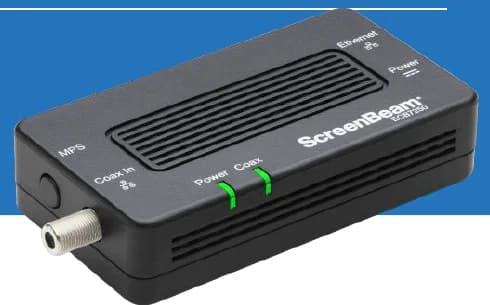
A two-adapter option for wired backhaul when a usable coax path already connects the router area and a weak room.
- 2 adapters in kit
- 2.5GbE port per adapter
- Uses existing coax
Before you buy: Confirm both outlets share a compatible coax system. Satellite and some provider setups are incompatible; DOCSIS 3.1 can conflict. Check splitters and any required point-of-entry filter before buying.
Common Wi-Fi 7 Upgrade Mistakes
Most disappointing Wi-Fi 7 upgrades fail because the network path behind the node stayed weak.
- Buying premium Wi-Fi 7 hardware before checking switch ports, jacks, and backhaul
- Leaving the ISP gateway, ONT handoff, or modem uplink at 1 GbE and expecting the new router to deliver more than 1 Gbps from the wall
- Testing a Wi-Fi 7 router with an older Wi-Fi 6 client and assuming the router is slow
- Chasing 320 MHz channel width in a dense or difficult floor plan where 160 MHz would be steadier
- Putting nodes inside cabinetry, on the floor, or behind a TV where heat and blockage both hurt results
- Ignoring building materials and trying to solve a masonry problem with marketing claims
FAQs
Is Wi-Fi 7 worth it for a 1 Gbps internet plan?
Sometimes. If you have several Wi-Fi 7 devices, heavy local traffic, or you want a longer refresh cycle, it can still make sense. If your current 1 Gbps home is stable on Wi-Fi 6E, the value case is weaker.
Does Wi-Fi 7 fix dead zones by itself?
No. Wi-Fi 7 can improve supported links, but dead zones are usually a placement, backhaul, or construction problem first.
Will older smart-home devices still work?
Yes. Wi-Fi is backward-compatible, so older devices still connect on 2.4 GHz or 5 GHz. Many smart-home devices will not benefit from Wi-Fi 7, but they will still join the network.
Do I need a new modem or switch for Wi-Fi 7?
If you want multi-gig WAN or multi-gig backhaul, usually yes. One 1 GbE modem, switch, or wall jack can cap the entire path even when the Wi-Fi side is capable of more. Use the 2.5GbE no-rewire upgrade guide to check the full bottleneck path before replacing hardware.
Can my ISP gateway bottleneck a Wi-Fi 7 upgrade?
Yes. If your fiber ONT, cable modem, or ISP gateway only hands off 1 GbE, the router cannot pull more than 1 Gbps from the wall even if the Wi-Fi side and your client devices are capable of more. Check the WAN-facing port before you assume the router is the problem. The AT&T Fiber vs Spectrum vs Xfinity comparison covers how ISP speed tiers and upload speeds differ.
References
- Wi-Fi Alliance: Wi-Fi CERTIFIED 7 — checked March 14, 2026
- MoCA Alliance: MoCA Home 2.5 — checked March 14, 2026
- Apple Support: Wi-Fi and Ethernet specifications for Apple devices — checked March 14, 2026
- Apple: iPhone 17 Pro technical specifications — checked March 14, 2026
- Samsung: Galaxy S25 Series Spec Sheet (PDF) — checked March 14, 2026
Next steps
If you want the upgrade to feel better in real rooms instead of just on a spec sheet, start with a placement and backhaul plan. We can map the layout, test the weak spots, wire the nodes that matter, and hand off a clean setup that stays predictable.
Plan the project with a site visit
Confirm wiring, equipment, placement, and installation scope before hardware is locked in.