

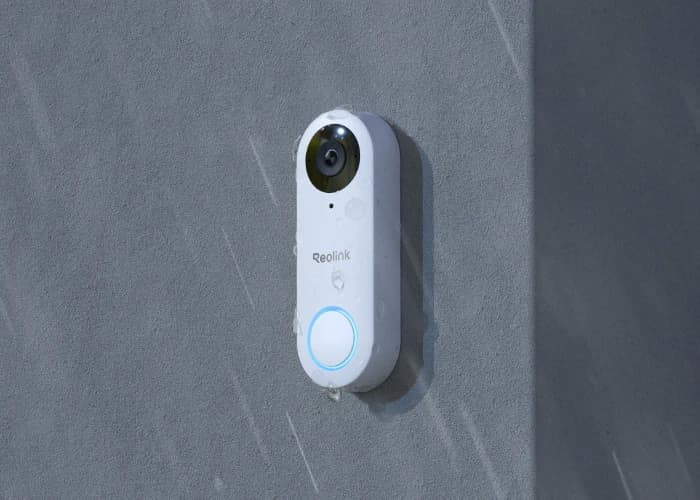
- Executive Summary: Reolink PoE vs WiFi
- Which Reolink video doorbell is better overall?
- How we compared Reolink Video Doorbell PoE and WiFi
- What are the differences between Reolink PoE and WiFi doorbells?
- Reolink Video Doorbell PoE: Best for local-first wired setups
- Which Reolink doorbell is best for existing wiring?
- Which Reolink doorbell is best for local NVR recording?
- What actually changes between Reolink PoE and WiFi doorbells?
- Should you buy the black or white Reolink doorbell?
- How do Reolink doorbells work with Home Assistant, Alexa, and Google Home?
- Do Reolink doorbells support pre-motion recording?
- FAQ
- References
Executive Summary: Reolink PoE vs WiFi
Choose the PoE model for the cleanest local-first wired setup. Choose the WiFi model if you want to reuse existing doorbell power without pulling Ethernet.
Both models deliver 5MP front-door coverage, local recording, and no mandatory monthly fee. The main differences are network path, cloud and rich-notification support, and whether you want the black 4:3 version or the white 3:4 version with package detection.
- Best overall: Reolink Video Doorbell PoE.
- Best retrofit pick: Reolink Video Doorbell WiFi.
- Best for no-subscription local recording: either model.
- Best for Reolink Cloud and rich notifications: Reolink Video Doorbell WiFi.
- Best for NVR-first wired systems: Reolink Video Doorbell PoE.
- Best for package detection: the white PoE or white WiFi version, not the black version.
- Best Reolink cameras
- Smart doorbell and lock integration guide
- Matter cameras and doorbells planning
- NVR vs NAS vs cloud storage for camera footage
Which Reolink video doorbell is better overall?
The Reolink Video Doorbell PoE is the stronger overall choice because Ethernet is still the cleaner network path for a permanent front-door camera.
The PoE model fits better when the doorbell is part of a broader local-first camera plan. It avoids Wi-Fi dependency at the front entry, works naturally with a Reolink NVR workflow, and stays aligned with the same hardwired logic that usually makes the rest of a camera system easier to manage.
The WiFi model is still a good option. In many homes it is the more practical choice because existing doorbell power is already present while an Ethernet run is not. If the main obstacle to PoE is the cable path, WiFi is the simpler answer and not a downgrade in the core image or front-door role.
How we compared Reolink Video Doorbell PoE and WiFi
This comparison is based on installation fit, local recording behavior, and front-door workflow.
Both doorbells were re-checked against current official Reolink product, store, and support documentation on April 30, 2026. The comparison gives the most weight to the questions that matter at the front door:
- Network path: Ethernet reliability versus Wi-Fi retrofit convenience.
- Power path: whether existing doorbell wiring is enough or whether a new cable run changes the project.
- Recording workflow: local microSD and NVR fit versus optional cloud convenience.
- Notification model: whether rich notifications and cloud backup are part of the reason to buy.
- Framing and placement: how the doorbell works for faces, packages, and a narrow porch approach.
If you are still choosing the rest of the camera layout, the broader home security camera design guide is the better starting point. This article is specifically about the front-door decision once you already know you want a Reolink doorbell.
What are the differences between Reolink PoE and WiFi doorbells?
The main differences are network connection, Cloud and rich-notification support, and how each model fits into a local recorder workflow.
| Model | Best for | Why choose it | Typical price | Watch out for |
|---|---|---|---|---|
| Video Doorbell PoE | Best overall and best wired setup | Ethernet connectivity, clean fit with local NVR workflows, and the strongest long-term infrastructure path | About $99 to $110 | Requires a workable Ethernet path to the door if you want the full PoE advantage |
| Video Doorbell WiFi | Best retrofit and easiest install | Uses existing doorbell power, keeps the same core 5MP doorbell job, and adds Reolink Cloud plus rich notifications | About $90 to $120 | Wi-Fi quality at the front entry still affects reliability |
| Model | Network path | Power supply | Resolution and framing | Field of view | Storage and cloud | Current software notes |
|---|---|---|---|---|---|---|
| Video Doorbell PoE | Ethernet | 12-24V AC, 24V DC, or IEEE 802.3af active PoE | Black: 2560 x 1920 4:3; White: 1920 x 2560 3:4 | Black: 135° H / 100° V; White: 100° H / 135° V | microSD up to 256GB, Reolink NVR, Home Hub, FTP | White version adds package detection; pre-motion recording supported |
| Video Doorbell WiFi | Dual-band Wi-Fi | 12-24V AC or 24V DC | Black: 2560 x 1920 4:3; White: 1920 x 2560 3:4 | Black: 135° H / 100° V; White: 100° H / 135° V | microSD, Reolink NVR, Home Hub, FTP, plus Reolink Cloud | White version adds package detection; rich notifications and pre-motion recording supported |
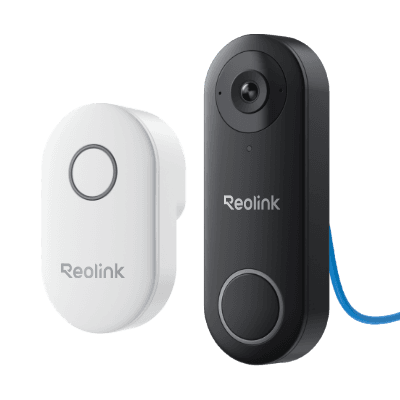
REOLINK
Reolink Video Doorbell PoE
Best for Ethernet, NVR, and local-first front-door recording.
Key details
- Best fit for Reolink NVR, Home Assistant, or NAS-led local recording setups
- PoE keeps the front door on a stable wired path with no Wi-Fi dependency
- White versions add taller 3:4 framing and package detection; black versions stay wider at 4:3
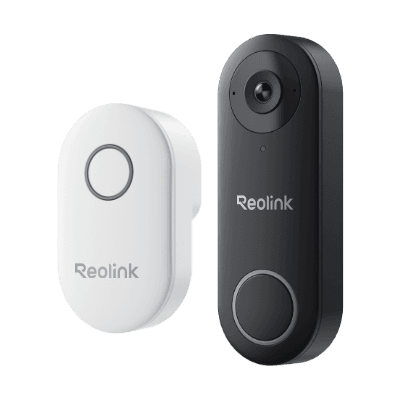
REOLINK
Reolink Video Doorbell WiFi
Best for existing doorbell wiring when you want to skip a new Cat6 run.
Opens search results. Match the model and bundle before ordering.
Find options on AmazonOfficial specificationsKey details
- Best fit when transformer power exists but Ethernet would add unnecessary labor
- Rich notifications and optional Reolink Cloud support are available on the plug-in Wi-Fi model
- White versions add taller 3:4 framing and package detection; black versions stay wider at 4:3
Reolink Video Doorbell PoE: Best for local-first wired setups
The Reolink Video Doorbell PoE is the right buy for homeowners who want the front door to behave like the rest of a wired camera system.
REOLINK
Reolink Video Doorbell PoE
Best for Ethernet, NVR, and local-first front-door recording.
Key details
- Best fit for Reolink NVR, Home Assistant, or NAS-led local recording setups
- PoE keeps the front door on a stable wired path with no Wi-Fi dependency
- White versions add taller 3:4 framing and package detection; black versions stay wider at 4:3
- Network path: wired Ethernet
- Power path: 12-24VAC, 24VDC, or 802.3af active PoE
- Recording path: local microSD plus Reolink NVR workflows
- Best fit: stable entry coverage inside a broader hardwired camera plan
This is the cleaner long-term choice when the house already has an Ethernet route to the front entry or when you are willing to add one. A PoE doorbell behaves more predictably as part of a fixed camera system. That matters when the rest of the house already uses PoE cameras, a local recorder, or a managed switch.
On finished homes, the harder part is usually the cable path, not mounting the doorbell itself. Running Cat6 cleanly to a porch wall and back to a PoE switch or rack location is often the real project constraint.
The PoE model is also the better fit when front-door footage needs to stay inside the same retention plan as driveway and perimeter cameras. If you are deciding between a Home Hub, Home Hub Pro, or NVR, the Home Hub vs Home Hub Pro vs NVR comparison covers which recorder fits which system size. For broader NVR vs NAS vs cloud tradeoffs, the NVR vs NAS vs cloud storage guide covers the general approach.
Which Reolink doorbell is best for existing wiring?
The Reolink Video Doorbell WiFi is the better buy for most existing doorbell wiring retrofits because it uses standard doorbell power without requiring a new Ethernet run.
REOLINK
Reolink Video Doorbell WiFi
Best for existing doorbell wiring when you want to skip a new Cat6 run.
Opens search results. Match the model and bundle before ordering.
Find options on AmazonOfficial specificationsKey details
- Best fit when transformer power exists but Ethernet would add unnecessary labor
- Rich notifications and optional Reolink Cloud support are available on the plug-in Wi-Fi model
- White versions add taller 3:4 framing and package detection; black versions stay wider at 4:3
- Network path: dual-band Wi-Fi
- Power path: 12-24VAC or 24VDC
- Recording path: local microSD plus Reolink Cloud support on the plug-in model
- Best fit: fast retrofit with lower install friction
This is the practical answer for many finished homes. The front door already has a power path, but the network path is weak or nonexistent. In that case, WiFi avoids extra project scope while keeping the same basic front-door coverage role as the PoE version.
The main caveat is signal quality. Masonry, metal doors, stone veneer, and porch framing still affect reliability. If the entry sits on the weak edge of the network, improving Wi-Fi coverage usually matters more than changing the doorbell model. The broader smart doorbell and lock integration guide is the better companion if the front door still needs power, Wi-Fi, and app-path planning.
Reolink's current installation guide says Video Doorbell PoE and WiFi can use existing doorbell wiring for power, but they will not work with the existing mechanical chime. Reolink says to bypass the old mechanical chime and pair the doorbell with a Reolink Chime instead. Google Home and Alexa can still receive notifications separately.
Which Reolink doorbell is best for local NVR recording?
The Reolink Video Doorbell PoE is the better fit for continuous local recording because it sits on the same wired network path as a typical NVR-based system.
Both doorbells can record locally and both avoid mandatory monthly fees. The difference is that PoE is easier to treat as a fixed infrastructure endpoint, while WiFi depends on the strength and stability of the wireless network at the front entry.
If your top priority is uninterrupted 24/7 recording to a Reolink NVR, PoE is the cleaner answer. If the entry already has good Wi-Fi and you are mostly solving for retrofit speed, the WiFi model still works well and can record to local Reolink storage paths over the network.
Choose PoE instead when one of these is true:
- You have Cat6 at the front entry already.
- You are rewiring anyway.
- The front door needs to land on the same wired camera backbone as the rest of the house.
What actually changes between Reolink PoE and WiFi doorbells?
The camera hardware is nearly the same, but the infrastructure and software path are different.
- PoE uses Ethernet and fits more naturally into a local NVR workflow.
- WiFi uses existing doorbell power and avoids a new cable run.
- Both support local recording without a mandatory subscription.
- WiFi adds Reolink Cloud support and rich notifications.
That last point is the clearest software difference. Reolink's current support documentation says WiFi plug-in and battery doorbells support Reolink Cloud storage and rich notifications, while the PoE and WiFi plug-in models both support local storage, chime pairing, and the same broad smart-home notification paths.
Should you buy the black or white Reolink doorbell?
Buy the black version for a wider 4:3 view. Buy the white version if you want taller 3:4 framing and package detection.
Reolink's current support comparison page shows an important difference across the PoE and WiFi plug-in doorbells. The black version uses a 2560 x 1920 4:3 layout with 135° horizontal and 100° vertical coverage. The white version uses 1920 x 2560 3:4 framing with 100° horizontal and 135° vertical coverage.
That matters at the porch:
- Choose black when you care more about side-to-side context across the walkway and entry.
- Choose white when you care more about taller vertical framing for a tighter porch or a stronger package-zone view.
Reolink's support documentation also says the white PoE and white WiFi models support package detection, while the black PoE and black WiFi models do not. That is a real buying factor if porch delivery tracking matters more than a wider yard-facing view.
Most mainstream U.S. product listings and review discussions still center on the black version, which is why this article uses the black-model framing for direct side-by-side specs.
How do Reolink doorbells work with Home Assistant, Alexa, and Google Home?
Both doorbells support Google Home and Alexa notifications, and Reolink's current support documentation says the doorbell series also supports Home Assistant integration.
For smart-home buyers, the practical difference is still network design, not a separate feature lockout. The PoE model is usually the cleaner choice for a local-first Home Assistant deployment because the camera stays on a wired network path. The WiFi model still works with the same broader smart-home ecosystem, but its day-to-day reliability is more dependent on front-door wireless conditions.
Reolink's current third-party compatibility guidance and Synology support documentation also make these doorbells relevant to prosumer local-recording setups. When ONVIF or the Reolink protocol is part of the plan, the PoE model is usually the simpler fit for NAS and Surveillance Station style workflows.
If your priority is local ownership with app-based review and minimal cloud dependence, PoE is still the stronger default. If your priority is snapshot-style push alerts and optional Reolink Cloud backup, WiFi has the clearer software advantage.
Do Reolink doorbells support pre-motion recording?
Yes. Reolink's current product pages list pre-motion recording support on both the PoE and WiFi doorbells.
That matters because wired doorbells are less likely to miss the start of an event than a battery-first design. In practice, pre-motion recording helps capture the approach to the door instead of only the moment after a person has already entered the frame.
FAQ
Do Reolink Video Doorbell PoE and WiFi work without a monthly fee?
Yes. Both models support local recording and do not require a mandatory monthly subscription to function as video doorbells.
Can both Reolink doorbells record 24/7?
Yes. Reolink's current product and store guidance says the PoE and WiFi plug-in doorbells support continuous 24/7 recording when the storage path is configured correctly.
Does the WiFi doorbell support Reolink Cloud and rich notifications?
Yes. Reolink's current support documentation says the WiFi plug-in and battery doorbells support Cloud storage and rich notifications, while the PoE model does not follow that same cloud-first path.
Does the existing mechanical chime still work with Reolink Video Doorbell PoE or WiFi?
No. Reolink's current installation guide says the PoE and WiFi doorbells will not work with the existing mechanical chime when powered from old doorbell wiring. Reolink says to bypass the old mechanical chime and pair the doorbell with a Reolink Chime instead.
What height should you mount a Reolink doorbell?
Reolink's current doorbell guidance recommends mounting at about 1.2 meters, or roughly 4 feet, above the ground. That usually gives the best balance between visitor face framing and package visibility.
Can I use either Reolink doorbell without internet access?
Local motion detection and local recording can still work, but remote alerts and remote live view do not. If the chime is paired, the doorbell can still ring locally when pressed.
Which Reolink doorbell versions support package detection?
Reolink's current support comparison says the white PoE and white WiFi plug-in models support package detection, while the black PoE and black WiFi plug-in models do not.
References
- Reolink Video Doorbell PoE official page - checked April 30, 2026
- Reolink D340W official page - checked April 30, 2026
- Introduction to Reolink Video Doorbell Cameras - checked April 30, 2026
- How to Install Reolink Video Doorbell Cameras to the Existing Doorbell Wiring - checked April 30, 2026
- How to Add Reolink Cameras to Synology Surveillance Station - checked April 30, 2026