

- Quick answer
- Compare the four switch designs
- How to size PoE before choosing a model
- Best compact UniFi option: Switch Flex 2.5G PoE
- Best mixed UniFi closet: Switch Pro Max 16 PoE
- Best quiet Omada option: SG2210XMP-M2
- Best higher-power Omada closet: SG3210XHP-M2
- When a gigabit PoE switch is enough
- Installation checklist
- FAQs
- Sources
Quick answer
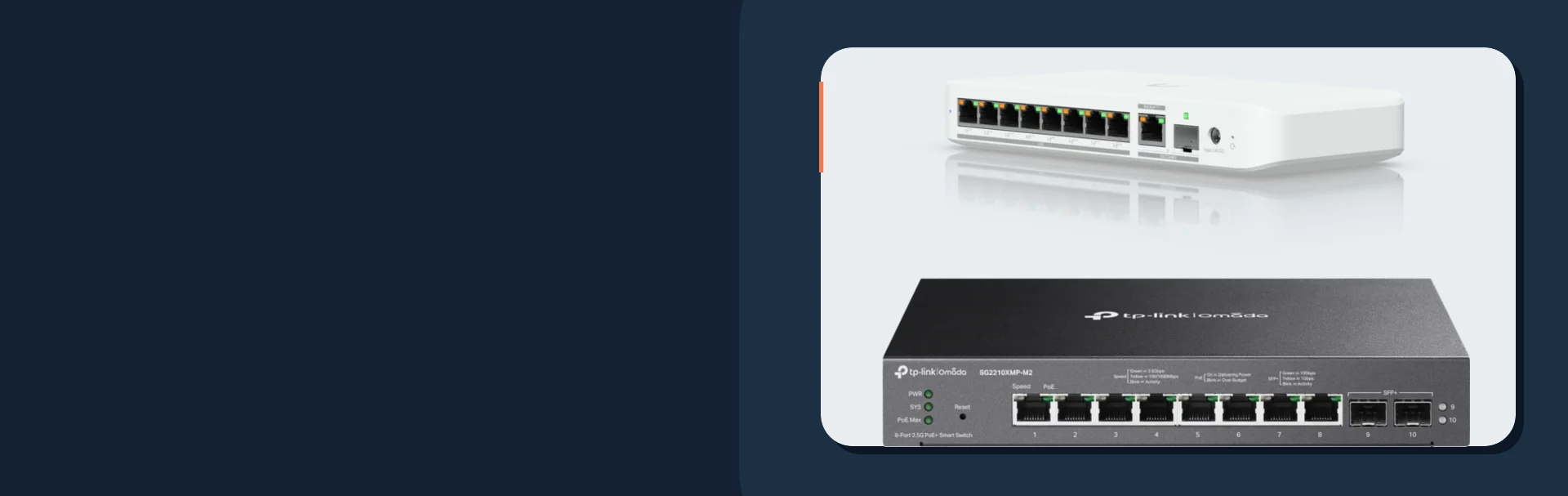
The best 2.5GbE PoE switch is the one that powers every planned access point and camera while leaving enough fast ports and uplink capacity for the actual network. For a compact UniFi installation, the Switch Flex 2.5G PoE is a useful starting point if its power input and adapter cost are included. For a larger UniFi closet with many ordinary gigabit cameras, the Switch Pro Max 16 PoE has more total ports, but only four are 2.5GbE. For Omada, the SG2210XMP-M2 provides eight 2.5GbE PoE+ ports in a fanless design; the SG3210XHP-M2 raises the total power budget to 240W and uses fans.
These are specification-based fit picks, not a claim that we have benchmarked all four switches head to head. Manufacturer specifications were checked on September 29, 2026. Confirm the exact hardware revision, power supply, seller, and availability before ordering.
- Count 2.5GbE PoE ports separately from total Ethernet ports. A 16-port switch may have only four multi-gig AP ports.
- Check both the per-port PoE standard and total wattage. A large total budget cannot fix a port that cannot provide the power an endpoint requires.
- Price the power source. The UniFi Flex 2.5G PoE AC adapter is sold separately, and the usable PoE budget depends on input power.
- Use a 10G uplink when several 2.5G devices will regularly move traffic across the same upstream link; do not buy it for a single lightly used AP.
- Budget gigabit PoE switches
- Upgrade to 2.5GbE without rewiring
- UniFi U7 Pro setup guide
- Omada Wi-Fi 7 for small businesses and large homes
Compare the four switch designs
| Model | Fast PoE ports | Other ports and uplink | Published PoE budget | Placement and main caveat |
|---|---|---|---|---|
| UniFi Flex 2.5G PoE | 8 × 2.5GbE PoE++ | 10GbE RJ45/SFP+ combination uplink | 196W model rating with suitable input | Compact; AC adapter sold separately and PoE availability varies by input |
| UniFi Pro Max 16 PoE | 4 × 2.5GbE PoE++ | 12 × 1GbE PoE+; 10G uplink | 180W | More ports for mixed AP/camera closets; only four fast ports |
| Omada SG2210XMP-M2 | 8 × 2.5GbE PoE+ | 2 × 10G SFP+ | 160W | Fanless desktop or wall placement; no PoE++ output |
| Omada SG3210XHP-M2 | 8 × 2.5GbE PoE+ | 2 × 10G SFP+ | 240W | Rack switch with two fans; no PoE++ output |
Ubiquiti
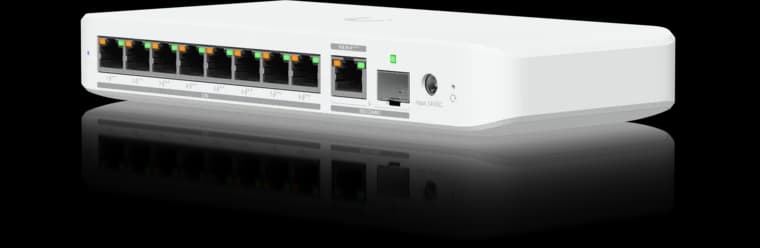
Ubiquiti Switch Flex 2.5G PoE
Eight 2.5GbE PoE++ ports in a compact UniFi switch for a small Wi-Fi 7 and camera deployment.
- 8 × 2.5GbE PoE++
- 10G combo uplink
- Power input affects PoE budget
Before you buy: The AC power adapter is sold separately; available PoE output depends on the power input.

Ubiquiti
Ubiquiti Switch Pro Max 16 PoE
A UniFi closet switch for a few 2.5GbE APs plus a larger group of gigabit cameras and devices.
- 4 × 2.5GbE PoE++
- 12 × 1GbE PoE+
- 180W PoE budget
Before you buy: Only four ports are 2.5GbE; the other twelve are gigabit. Check current stock.
TP-Link Omada
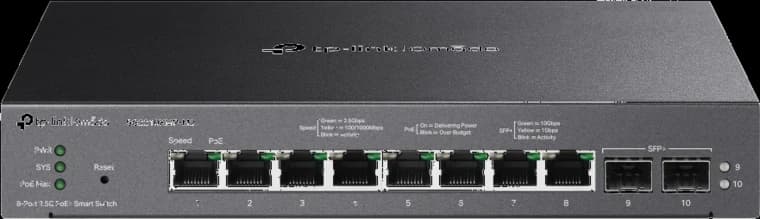
TP-Link Omada SG2210XMP-M2
A quiet eight-port 2.5GbE PoE+ switch for Omada APs and a modest camera load.
- 8 × 2.5GbE PoE+
- 2 × 10G SFP+
- 160W PoE budget
Before you buy: The total budget is 160W; eight PoE+ ports cannot all deliver 30W simultaneously.

Eight 2.5GbE PoE+ ports and a 240W budget for a higher-load Omada AP and camera closet.
- 8 × 2.5GbE PoE+
- 2 × 10G SFP+
- 240W PoE budget
Before you buy: Uses two fans and provides PoE+ rather than PoE++ per port.
The switch should match the AP ecosystem when central management is useful, but protocol compatibility is broader than the brand label. A standards-compliant PoE+ AP can run from a suitable switch of another brand. You may lose one-pane management, but you do not need to buy an underpowered switch just to keep the logos identical.
How to size PoE before choosing a model
List each powered device with its manufacturer-rated maximum draw and required input standard. Then add the device maxima, allow practical headroom, and confirm that each switch port can deliver the needed class. Cameras can draw more at night when infrared lights, heaters, or motors run. Access points can draw more when radios and auxiliary functions are active. Budget from the documented maximum rather than a quiet daytime reading.
For example, two U7 Pro APs rated at 21W maximum plus four hypothetical 12W cameras total 90W. Adding 25% planning headroom gives 112.5W. This is a sizing example, not a specification for any particular camera. An eight-port switch with only 60W of usable PoE would be undersized even though it has enough sockets. The U7 Pro also requires PoE+, so check the individual ports as well as the switch total.
For a denser example, three 25.4W-class APs plus four 12W cameras total 124.2W. With 25% headroom, the target becomes about 155W. A 160W switch is close to that target; future cameras or higher-draw devices would justify more capacity. Confirm the real AP models and their power requirements before applying the example to a project.
| Check | What to write down | Why it matters |
|---|---|---|
| Per-device maximum | Manufacturer maximum draw and PoE class | Avoids power resets under peak load |
| Port count | Today’s APs/cameras plus planned additions | Keeps an uplink or spare port from being counted as a powered endpoint |
| Total budget | Sum of maxima plus headroom | Protects against peak-time overcommitment |
| Power input | Included AC supply, optional AC supply, or PoE input | Some compact switches advertise a budget that depends on how they are powered |
| Uplink | 1G, 2.5G, or 10G path to the gateway/core | Prevents several fast ports sharing an unnecessarily slow upstream link |
Best compact UniFi option: Switch Flex 2.5G PoE
Ubiquiti lists the Flex 2.5G PoE with eight 2.5GbE PoE++ ports and a 10GbE RJ45/SFP+ combination uplink. This layout is attractive when two or three Wi-Fi 7 APs and nearby wired devices need a compact switch. It also keeps switch management inside UniFi.
The power input is the buying trap. Ubiquiti says the AC adapter is sold separately and actual PoE availability may vary with input cable length and quality. Its 196W model label should not be read as a guaranteed output from any upstream PoE source. Add the correct adapter or confirm the available PoE input budget before comparing its installed price with a switch that includes a power supply.
Best mixed UniFi closet: Switch Pro Max 16 PoE
The Pro Max 16 PoE makes sense when a closet has a few 2.5GbE APs plus a larger group of gigabit cameras, phones, or controllers. Ubiquiti specifies four 2.5GbE PoE++ ports, twelve gigabit PoE+ ports, a 10G uplink path, and 180W total PoE. The four fast ports are the constraint to count first. If the project needs six or eight multi-gig AP ports, this is the wrong port layout even though the chassis has sixteen Ethernet ports.
Check stock before making it a project standard. Ubiquiti's US store showed this model out of stock when checked on September 29, 2026. A current product page is evidence of specifications, not of immediate availability.
Best quiet Omada option: SG2210XMP-M2
The Omada SG2210XMP-M2 provides eight 2.5GbE PoE+ ports, two 10G SFP+ uplinks, and a 160W total budget. TP-Link lists up to 30W output per PoE+ port and a fanless desktop or wall-mounted design. It is a useful fit where all planned APs are PoE+ rather than PoE++ and the switch will live close enough to people that fan noise matters.
The 160W total needs deliberate sizing. Eight 30W ports do not mean the switch can supply 240W at once. Use the actual device list, and leave headroom rather than filling all eight ports with near-maximum loads.
Best higher-power Omada closet: SG3210XHP-M2
The Omada SG3210XHP-M2 keeps eight 2.5GbE PoE+ ports and two 10G SFP+ uplinks, but raises the published total budget to 240W. TP-Link lists two fans and rack mounting. Choose it when the extra power budget is genuinely needed and the switch can sit in a ventilated closet or rack. The extra 80W does not change its PoE+ per-port standard into PoE++.
When a gigabit PoE switch is enough
Many fixed cameras use gigabit or slower Ethernet, and a 1GbE AP uplink may already be sufficient for a light workload. If the plan has no multi-gig WAN, NAS traffic, or Wi-Fi 7 APs that benefit from faster wired uplinks, a well-sized gigabit PoE switch can save money. The budget PoE switch guide covers that separate buying intent.
If only one room needs a fast desktop or NAS link, a small non-PoE 2.5GbE switch alongside an existing PoE switch may also be sensible. See the no-rewire 2.5GbE upgrade guide. Do not replace every switch merely because one endpoint can negotiate 2.5GbE.
Installation checklist
- Mark every powered endpoint on the floor plan and record its exact model and PoE standard.
- Add maximum watts, then allow headroom and check each port's output class.
- Count actual 2.5GbE PoE ports, gigabit PoE ports, and uplink ports separately.
- Check the switch's power source, adapter inclusions, fan noise, mounting, ventilation, and UPS load.
- Confirm cable condition and negotiated link speed after installation. An old patch cord or termination can hold a 2.5GbE path at 1GbE.
- Test peak PoE loads, including camera night mode, and document the final port map.
We map the APs, cameras, cabling, uplinks, and UPS as one system, then specify hardware that fits the real load.
FAQs
Do Wi-Fi 7 access points require 2.5GbE?
No. Many work on a gigabit connection, but the uplink can limit local throughput. Check the exact AP's port and your workload before paying for faster switching.
Is a 160W switch enough for eight PoE+ devices?
Only if the combined maximum draw and desired headroom fit within 160W and each port can supply the required PoE class. Eight ports times the 30W PoE+ per-port limit is greater than a 160W switch total.
Does a 10G uplink make each AP faster?
No. It gives several downstream devices more shared upstream capacity. The AP's own Ethernet port, Wi-Fi link, client, and destination still set its individual ceiling.
Can I mix UniFi APs with an Omada or NETGEAR switch?
Yes, when the port speed and PoE standard are compatible. The tradeoff is management integration, not basic Ethernet or standards-compliant power delivery.
Sources
- Ubiquiti Switch Flex 2.5G PoE — ports, uplink, power-input caveat; checked September 29, 2026.
- Ubiquiti Switch Pro Max 16 PoE — port mix, budget, and availability; checked September 29, 2026.
- Omada SG2210XMP-M2 — 160W, fanless, port standards; checked September 29, 2026.
- Omada SG3210XHP-M2 — 240W, fans, and port standards; checked September 29, 2026.
- Ubiquiti U7 Pro — AP power and uplink context; checked September 29, 2026.
Plan the project with a site visit
Confirm wiring, equipment, placement, and installation scope before hardware is locked in.