

- Quick summary
- Why Compare the U7 Mesh, U7 Pro, and U7 Pro Wall?
- Specs at a glance
- What Is the UniFi U7 Mesh Used For?
- When Should You Choose the U7 Pro?
- When Should You Choose the U7 Pro Wall?
- Which one works best in older Westchester homes?
- What Are the PoE, Controller, and Mounting Requirements?
- Recommended hardware
- Which one should you buy?
- FAQs
- References
Quick summary
If you want the short answer, start with this: the U7 Pro is the best default choice for most wired UniFi Wi-Fi 7 installs, the U7 Pro Wall is the better answer when ceiling placement is unrealistic or ugly, and the U7 Mesh is the specialist pick for flexible placement and indoor/outdoor edge coverage.
These three access points do different jobs. The U7 Mesh is a 4-stream dual-band model with no 6 GHz radio. The U7 Pro and U7 Pro Wall are 6-stream tri-band models with 6 GHz support. That difference matters more than the small gap in list price.
- Buy the U7 Pro when you can ceiling-mount, run Ethernet cleanly, and want the strongest all-around UniFi Wi-Fi 7 value.
- Buy the U7 Pro Wall when the room needs a wall-mounted AP and you want Wi-Fi 7 plus 6 GHz without opening ceilings.
- Buy the U7 Mesh when the install needs a compact indoor-outdoor form factor or shelf, pole, or patio-adjacent placement.
- Do not buy the U7 Mesh expecting it to behave like a wall or ceiling version of the U7 Pro. Its radio package is different.
Why Compare the U7 Mesh, U7 Pro, and U7 Pro Wall?
UniFi's Wi-Fi 7 lineup is now wide enough that buyers are no longer choosing only by generation. They are choosing by deployment style.
That is a healthy change. Older Wi-Fi buying advice often treated access points like interchangeable circles on a floor plan. Real projects are not that clean. A finished colonial with no easy ceiling access has different constraints than a renovation with open walls. A patio-adjacent family room needs different hardware than a second-floor office with a clean hall ceiling outside the door.
These three models are worth comparing together because they sit close in price but solve different physical problems.
At current US store pricing, the U7 Pro is $189, while the U7 Pro Wall and U7 Mesh are both $199. The U7 Mesh is currently listed as sold out on the US store. That price proximity makes form factor and radio capability more important than sticker price.
Specs at a glance
| Model | Bands | Streams | Uplink | Power | Mounting | Best fit |
|---|---|---|---|---|---|---|
| U7 Mesh | 2.4 GHz + 5 GHz | 4 | 2.5 GbE | PoE, 13W max | Wall, pole, or table stand | Flexible placement, patio edge, indoor/outdoor-adjacent coverage |
| U7 Pro | 2.4 GHz + 5 GHz + 6 GHz | 6 | 2.5 GbE | PoE+, 21W max | Ceiling or wall | Best default for wired ceiling deployments |
| U7 Pro Wall | 2.4 GHz + 5 GHz + 6 GHz | 6 | 2.5 GbE | PoE+ | Wall mount | Finished-room retrofit and room-specific wall placement |
One detail matters more than the marketing names: the U7 Pro and U7 Pro Wall share the higher-tier radio class in this comparison. The U7 Mesh does not. It is still a useful Wi-Fi 7 product, but it is a different kind of answer.
| Model | Typical street price | Best for |
|---|---|---|
| Buy U7 Pro | $189 | You can ceiling-mount, want 6 GHz, and want the safest all-around choice |
| Buy U7 Pro Wall | $199 | You need a wall-mounted AP in a finished room and still want tri-band Wi-Fi 7 |
| Buy U7 Mesh | $199 | You need flexible shelf, wall, pole, or patio-edge placement more than 6 GHz |
| Model | 6 GHz | Built-in switch | What to know |
|---|---|---|---|
| U7 Mesh | No | No | Flexible indoor/outdoor placement and long-range antenna design, but no 6 GHz |
| U7 Pro | Yes | No | Best default ceiling AP when cabling and placement are straightforward |
| U7 Pro Wall | Yes | No | Tri-band wall AP for finished rooms, but not a port-expansion device |
| U7 In-Wall | No | Yes | Cheaper wall AP with an integrated 2.5 GbE switch when the room also needs wired ports |
What Is the UniFi U7 Mesh Used For?
The U7 Mesh is a compact indoor/outdoor Wi-Fi 7 access point built for flexible placement, edge coverage, and wireless meshing rather than 6 GHz performance.
It is a dual-band, 4-stream model with a 2.5 GbE uplink, 13W max power draw, and an included PoE adapter. Ubiquiti describes it as a compact indoor/outdoor Wi-Fi 7 AP with an integrated long-range antenna system. Its tech specs list 6 dBi omnidirectional and 10 dBi directional 5 GHz antenna gain, which helps explain why it is the mesh-oriented model in this group.
Where it fits best:
- a back patio or pool-adjacent family room where one device has to help both inside and outside
- a townhouse or apartment where ceiling mounting is not realistic
- a finished home where a shelf, console, or sidewall position is easier than opening plaster
- a temporary or transitional install where flexible placement matters
Where it does not fit best:
- a buyer specifically upgrading for 6 GHz
- a project where the main goal is maximum Wi-Fi 7 headroom in a wired core
- a room-by-room retrofit that really wants a clean wall plate style AP
The U7 Mesh is not a tri-band substitute for the U7 Pro. It is a dual-band model with 2.4 GHz and 5 GHz only. If 6 GHz is a priority, keep the comparison focused on the U7 Pro and U7 Pro Wall.
That makes the U7 Mesh easier to place physically, but less compelling as the main AP in a higher-end Wi-Fi 7 refresh.
When Should You Choose the U7 Pro?
The U7 Pro is the best default choice when you can run Ethernet to a ceiling or high wall location and want tri-band Wi-Fi 7 with 6 GHz.
It combines 6 spatial streams, 6 GHz support, 2.5 GbE, PoE+, and a 21W max power draw at the lowest price in this comparison. That mix makes it the simplest recommendation for most serious UniFi home and small-office installs.
Why it wins by default:
- ceiling placement usually gives the most even room-to-room coverage
- tri-band with 6 GHz is the stronger long-term Wi-Fi 7 story
- 2.5 GbE and PoE+ fit well with current UniFi switching
- it avoids the compromises of both the wall-specific and mesh-specific form factors
The other reason to start here is operational. The U7 Pro behaves like the most predictable mainline UniFi AP in this group. If you are already planning Ethernet backhaul, conservative channel widths, and clean hall or stair landing mounts, it is the model that makes the fewest compromises.
The U7 Pro store page still lists Multi-Link Operation as coming via software update, so buyers should evaluate it on current behavior rather than future feature promises.
In practical terms, this is also the model with the clearest upside on fast 6 GHz clients. Inference from its published 320 MHz 6 GHz support and real deployment experience: with a 2.5 GbE wired backhaul and a compatible client nearby, single-client speeds above 1.5 Gbps are realistic. Treat that as a field expectation, not a guarantee.
When Should You Choose the U7 Pro Wall?
The U7 Pro Wall is the right choice for finished rooms that need a tri-band wall-mounted access point without cutting a ceiling.
It stays very close to the U7 Pro in core capability: 6 streams, 6 GHz, 2.5 GbE, PoE+, and 300+ client support. The difference is physical deployment, not just branding. Ubiquiti also sells an official $39 Table Stand for the U7 Pro Wall, which makes it a credible desk or shelf AP when a true wall mount is not ideal.
That matters in several common scenarios:
- a home office where the best cable path already lands at wall height
- a bedroom wing where ceiling access would mean cutting and patching
- a media room where a sidewall AP is less disruptive than a centered ceiling mount
- an older home where you want the AP to read like a planned device, not an afterthought
The U7 Pro Wall is also the better answer when you need a room-specific AP instead of broad central-floor coverage. In older homes, one isolated office or bedroom suite often behaves like its own RF problem. A wall-mounted AP inside or just outside that zone can solve the issue more cleanly than trying to overpower it from a hallway.
The main limitation is simple: the U7 Pro Wall is not a mini switch with Wi-Fi attached. It has one 2.5 GbE RJ45 networking interface, so buyers expecting the older in-wall "small switch on the wall" idea need to reset expectations.
That one detail is more important than it looks. If the room also needs hardwired ports for a TV, desk, game console, or small switch, budget that separately instead of assuming the wall AP will absorb that job.
What Is the Difference Between the U7 Pro Wall and U7 In-Wall?
The U7 Pro Wall is the higher-performance wall model. The U7 In-Wall is the cheaper wall model that adds a built-in switch.
| Model | Price | Bands | Streams | Ports | Best fit |
|---|---|---|---|---|---|
| U7 Pro Wall | $199 | 2.4 / 5 / 6 GHz | 6 | 1 x 2.5 GbE | Finished rooms that need tri-band wall-mounted Wi-Fi 7 performance |
| U7 In-Wall | $149 | 2.4 / 5 GHz | 4 | 3 x 2.5 GbE | Rooms that need wall-mounted Wi-Fi plus hardwired ports and PoE output |
The naming is easy to confuse, but the products solve different problems. If you need 6 GHz and the stronger radio package, choose the Pro Wall. If you need a wall AP that also feeds local wired devices, choose the U7 In-Wall.
Planning a room-by-room retrofit in a finished home? Request a consultation before buying hardware. Cable path and mount location usually matter more than the $50 price gap between these models.
Which one works best in older Westchester homes?
Older Westchester homes are where this comparison becomes less about model hierarchy and more about cable path realism.
If the house gives you clean access to a central hall ceiling, buy the U7 Pro first. That is still the most reliable way to create even coverage cells across bedrooms, landings, and adjacent rooms.
If the house is finished, the walls are dense, and the cable path already lands near a desk, media cabinet, or side wall, the U7 Pro Wall is often the smarter answer. It lets you put good hardware where the cable can actually go without forcing a ceiling mount that does not match the room.
If the project includes a patio edge, detached seating area, or one weird corner where indoor and outdoor coverage blur together, the U7 Mesh earns its place. It is especially useful when the goal is not "the best main AP" but "the least awkward AP for this exact edge condition."
Our practical rule:
- U7 Pro for central, wired, ceiling-first design
- U7 Pro Wall for room-specific retrofits and cleaner finished-wall installs
- U7 Mesh for flexible placement and edge-zone coverage where weather resistance or non-ceiling placement matters
In plaster, stone, and masonry-heavy homes, deployment discipline matters more than model prestige. The right placement usually matters more than the last step up in product tier.
What Are the PoE, Controller, and Mounting Requirements?
The U7 Pro and U7 Pro Wall require PoE+ power, while the U7 Mesh runs on standard PoE and includes a PoE adapter in the box.
These three models are close enough in price that infrastructure decides the real project cost. Three U7 Pro-class APs can draw up to 63W combined before you account for switch overhead or any other PoE devices. That is enough to expose the limits of smaller entry-level PoE switches.
Mounting is the other hidden variable:
- the U7 Pro rewards a proper ceiling or high wall position
- the U7 Pro Wall rewards a deliberate visible wall location
- the U7 Mesh rewards flexibility, especially where a table stand, wall bracket, or outdoor mount is easier than traditional AP placement
All three also assume you are already inside the UniFi controller ecosystem. They work best in wired deployments, especially when placement or building materials already make coverage sensitive.
| Model | Common mistake | Better move |
|---|---|---|
| U7 Mesh | Buying it as a cheaper-looking U7 Pro substitute | Use it only when flexible placement or edge-zone coverage is the real need |
| U7 Pro | Mounting it wherever cable was easiest instead of where coverage should start | Treat it as the main ceiling AP and build the cable path around that |
| U7 Pro Wall | Expecting in-wall switch behavior from a wall AP | Pair it with a separate switch or extra drop if the room needs wired ports too |
- Confirm whether the room actually benefits from 6 GHz. If yes, remove the U7 Mesh from the shortlist.
- Decide whether the best cable path lands in the ceiling, on a wall, or near a shelf or exterior-adjacent spot.
- Check switch PoE budget before choosing based on price alone.
- Choose the AP that fits the room geometry first, then tune the radios second.
- Do not let a $10 difference in list price push you into the wrong form factor.
Recommended hardware
If you already know which deployment style fits your room, these are the UniFi products worth comparing directly before you buy, including one small-footprint switch that fits the multi-gig and PoE discussion in this guide.
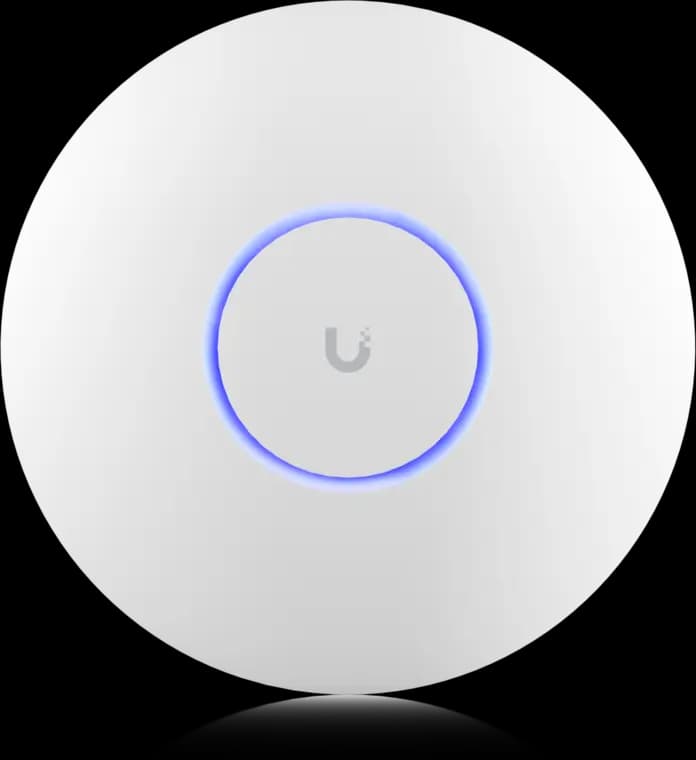
The practical UniFi Wi-Fi 7 baseline for planned ceiling locations: tri-band radios, a 2.5GbE uplink, and controller-based tuning without paying for a 10G AP edge.
- Tri-band Wi-Fi 7
- 2.5GbE uplink
- PoE+ powered
Before you buy: This Amazon link selects Adorama's US-model offer. Confirm Sold by Adorama, New condition, and that the PoE+ adapter is not included.

Wi-Fi 7 tri-band with 2.4, 5, and 6 GHz radios
Opens search results. Match the model and bundle before ordering.
Find options on AmazonOfficial specificationsKey details
- 6 spatial streams with a 2.5 GbE uplink and PoE+ power
- Single uplink port only, so it should not be treated as a wall switch
- Optional table stand makes it viable as a desk or shelf AP in finished spaces

Wi-Fi 7 dual-band with 2.4 and 5 GHz radios
Opens search results. Match the model and bundle before ordering.
Find options on AmazonOfficial specificationsKey details
- Integrated 2.5 GbE switch with extra local ports and PoE output
- Better fit than the Pro Wall when the room needs wired devices as well as Wi-Fi
- Lower-cost wall format at $149 on Ubiquiti's current store

Wi-Fi 7 dual-band with 2.4 and 5 GHz radios
Opens search results. Match the model and bundle before ordering.
Find options on AmazonOfficial specificationsKey details
- Integrated long-range antenna system for flexible placement and stronger mesh-oriented use cases
- 2.5 GbE uplink with PoE power and an included PoE adapter
- Better fit for patio-edge, shelf, pole, or indoor-outdoor transition zones than for 6 GHz-first deployments
Ubiquiti
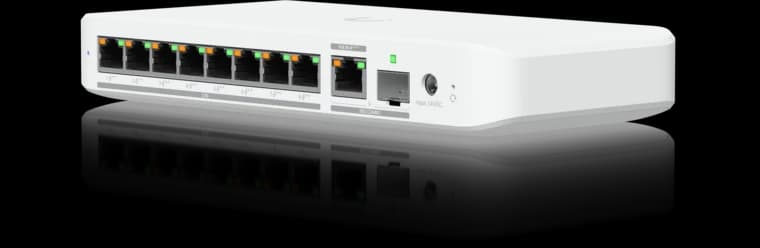
Ubiquiti Switch Flex 2.5G PoE
Eight 2.5GbE PoE++ ports in a compact UniFi switch for a small Wi-Fi 7 and camera deployment.
- 8 × 2.5GbE PoE++
- 10G combo uplink
- Power input affects PoE budget
Before you buy: The AC power adapter is sold separately; available PoE output depends on the power input.
Which one should you buy?
Buy the U7 Pro if you want the best default answer and the building lets you place it correctly.
Buy the U7 Pro Wall if the room needs a wall AP and you still want the stronger Wi-Fi 7 feature set, including 6 GHz.
Buy the U7 Mesh if the install has a legitimate flexible-placement or indoor/outdoor-edge problem and you can live without 6 GHz.
That is the cleanest way to think about the lineup. Buy by room geometry, cable path, and whether 6 GHz is actually part of your plan.
If you are planning a larger retrofit, the right next step is not ordering several APs before the layout is clear. It is mapping cable routes, mount positions, and switch power before hardware shows up.
We help Westchester homeowners and small offices decide where the cable should go, which AP shape fits the room, and when a ceiling, wall, or flexible-mount design is the right move.
FAQs
Is the U7 Mesh better than the U7 Pro because it costs the same?
No. It solves a different placement problem. The U7 Mesh is useful when you need flexible indoor or outdoor-adjacent deployment, but the U7 Pro has the stronger radio package for a main wired Wi-Fi 7 install because it includes 6 GHz and 6 streams.
Is the U7 Pro Wall basically the same hardware as the U7 Pro?
They are very close in headline specs. Both are current 6-stream tri-band Wi-Fi 7 models with 6 GHz support, 2.5 GbE uplink, and PoE+ power. The real difference is mounting style and where each model fits best physically.
What is the difference between the U7 Pro Wall and U7 In-Wall?
The U7 Pro Wall is the tri-band 6 GHz wall model with one 2.5 GbE port. The U7 In-Wall is the cheaper dual-band wall model with an integrated 2.5 GbE switch and PoE output for nearby devices.
Should I buy the U7 Mesh for an older house with plaster walls?
Only if the project genuinely needs its flexible form factor or indoor/outdoor edge behavior. For most older-house whole-home designs, the U7 Pro or U7 Pro Wall is the better starting point because the main challenge is usually placement and backhaul, not just finding a compact AP.
Do any of these access points remove the need for Ethernet backhaul?
No. They all benefit most from wired backhaul. In difficult homes, Ethernet placement still matters more than the Wi-Fi generation label on the box.
References
- Ubiquiti Store: U7 Pro
- Ubiquiti Store: U7 Mesh
- Ubiquiti Store: U7 Pro Wall
- Ubiquiti Store: U7 In-Wall
- Ubiquiti Tech Specs: U7 Mesh
- Ubiquiti Tech Specs: U7 Pro Wall
Plan the project with a site visit
Confirm wiring, equipment, placement, and installation scope before hardware is locked in.