


- Quick Answer
- MoCA 2.5 vs Ethernet vs Mesh: Which Should You Use?
- What Is MoCA 2.5?
- Typical MoCA Topology Diagram
- Pre-Purchase Coax Checklist
- When MoCA 2.5 Is the Best Answer
- When New Ethernet Is Better
- When Wireless Mesh Is Enough
- Splitters, Filters, and Provider Conflicts
- Recommended MoCA and Hybrid Network Gear
- Troubleshooting a MoCA Setup
- FAQs
- References and check dates
Quick Answer
MoCA 2.5 is usually the best retrofit backhaul when a finished home already has usable coax in the right rooms and new Ethernet would be disruptive. Fresh Cat6 or Cat6A is still the better long-term answer when walls are open, when you need PoE, or when the route is easy enough to wire cleanly. Wireless mesh is the fallback when neither coax nor Ethernet reaches the rooms that need help.
Think of the hierarchy this way:
- Ethernet first: best for new work, renovations, access points, cameras, desks, and any PoE device.
- MoCA 2.5 second: best when existing coax can create a wired path to a mesh node, access point, TV, gaming room, or office.
- Wireless mesh third: useful for flexibility, rentals, and low-disruption installs, but more sensitive to walls, distance, and airtime.
MoCA Alliance lists MoCA Home 2.5 at 2.5 Gbps MAC throughput with low latency over existing coax. That does not mean every laptop or mesh node will see 2.5 Gbps of internet speed. It means MoCA can provide a wired backbone that is often much steadier than asking one mesh node to relay through plaster, masonry, or stacked floors.
- Wired vs. wireless network planning
- Cat6 installation guide for homes and small businesses
- Network cabling cost guide
- Networking & Infrastructure services
MoCA 2.5 vs Ethernet vs Mesh: Which Should You Use?
Use the building, not the box, to make the decision. A premium mesh kit cannot fix a bad backhaul path. A MoCA kit cannot help if the coax outlets are isolated or filtered incorrectly. New Ethernet is excellent, but not every finished room justifies opening walls.
| Situation | Best first choice | Why | Watch out for |
|---|---|---|---|
| Plaster or masonry home with coax in the right rooms | MoCA 2.5 | Gives the remote node a wired path without fishing new cable through difficult walls | Splitters, filters, disconnected coax, and cable-provider conflicts |
| Renovation or open-wall project | Cat6 or Cat6A Ethernet | Lowest labor risk and best long-term flexibility while walls are open | Skipping spare runs, AP locations, or conduit |
| Rental or short-term layout | Wireless mesh | No wall work and easy relocation | Performance depends heavily on placement and wall materials |
| Home office or video-call room | Ethernet if practical; MoCA 2.5 if coax is available | A wired backhaul is usually more important than the Wi-Fi brand | One weak link between router, coax, adapter, and switch can bottleneck the room |
| Gaming room or media room with coax | MoCA 2.5 | Low-latency wired backhaul is usually steadier than a wireless relay hop | Make sure the console, TV, or switch is on Ethernet after the adapter |
| TV location only, no work calls or gaming | Mesh or MoCA | Either can be enough if the workload is light | Do not overspend if ordinary streaming already works |
What Is MoCA 2.5?
MoCA stands for Multimedia over Coax Alliance. In a home network, a MoCA adapter bridges Ethernet onto existing coaxial cable, then another adapter converts it back to Ethernet in a different room.
The useful part is not that coax is magical. It is that many finished homes already have coax runs behind the walls. If those runs connect through compatible splitters and are not isolated by old provider hardware, MoCA can turn those outlets into a wired network path without cutting new wall openings.
MoCA Home 2.5 is a 2.5 Gbps-class coax networking standard. Real device speed still depends on adapter Ethernet ports, splitter quality, coax condition, network load, and the router or switch on each end.
Typical MoCA Topology Diagram
A basic two-room MoCA setup has one adapter near the router and one adapter in the remote room. Some gateways have MoCA built in, but many homes still use a pair of standalone adapters.
Internet / ONT / cable modem
          |
       Router
          |
   Ethernet patch cable
          |
   MoCA adapter #1
          |
      Coax outlet
          |
   In-wall coax plant
          |
   MoCA-rated splitter
          |
      Coax outlet
          |
   MoCA adapter #2
          |
   Ethernet patch cable
          |
Mesh node, access point, switch, TV, game console, or desktop
For a cable-TV or cable-internet home, the coax plant may also need a point-of-entry filter and splitters that pass the MoCA frequency range. If satellite TV, legacy amps, disconnected coax runs, or provider-owned equipment are in the path, confirm compatibility before buying the kit.
Pre-Purchase Coax Checklist
Do this before buying adapters. It prevents the common "the lights never turn green" problem.
- Confirm that the router location and target room both have coax outlets
- Find where the coax runs meet: basement, utility room, structured panel, attic, or exterior demarcation
- Check whether the target outlets are on the same connected coax plant
- Look for old amplifiers, satellite splitters, abandoned cable-TV hardware, or disconnected runs
- Use splitters rated for the MoCA frequency range instead of old TV-only splitters
- Plan a point-of-entry filter when cable-provider coax is still connected and the provider or adapter instructions call for one
- Confirm every remote device has Ethernet or that the mesh node supports wired backhaul
- Buy adapters from the same MoCA 2.5 class, preferably models with certified interoperability
When MoCA 2.5 Is the Best Answer
MoCA is strongest when the coax is already where the network needs to go.
Common wins include a finished home office, a gaming room on another floor, a TV wall with weak Wi-Fi, or a mesh node that needs a stable uplink through dense construction. In those cases, MoCA can turn an existing coax outlet into the wired backhaul that the Wi-Fi system needed all along.
It is especially useful in older Westchester and Fairfield-style homes where plaster, stone, additions, and finished basements can make one extra Ethernet run more disruptive than expected. MoCA does not replace a thoughtful Wi-Fi design, but it can give that design a much better backbone.
For access-point sizing and placement, pair this with the Wi-Fi access point planning guide.
When New Ethernet Is Better
Run Ethernet when the wall is already open, when you need PoE, when the pathway is easy, or when the network endpoint matters enough to justify a permanent drop.
Ethernet still wins for ceiling APs, PoE cameras, door controllers, rack uplinks, workstations, NAS paths, and new construction. MoCA adapters require local power and do not carry PoE to a camera or access point by themselves. If the real project is "mount an AP in the right ceiling location," a coax outlet behind a TV may not solve it.
Use MoCA as a retrofit tool, not as an excuse to skip the proper cable path during renovation. If walls are open, pull the Ethernet, label it, and consider spare conduit.
When Wireless Mesh Is Enough
Wireless mesh is enough when the home is smaller, walls are ordinary wood-frame construction, the internet tier is modest, and the problem is coverage rather than backhaul stability.
It is also the practical choice for rentals and temporary layouts. A well-placed mesh node can be good enough for phones, tablets, and light streaming. The mistake is expecting wireless mesh to behave like a wired backbone through several dense walls or floors. If a node has a weak wireless path back to the router, every client behind that node inherits the problem.
MoCA and mesh are not enemies. A strong retrofit design often uses MoCA to wire one or two mesh nodes, then leaves the final client connection wireless.
Splitters, Filters, and Provider Conflicts
Most MoCA problems are not caused by the adapter. They are caused by the coax plant.
Old splitters may not pass the MoCA frequency range. Satellite splitters, amplifiers, and provider-specific equipment can block or distort the signal. Cable internet and cable TV can coexist with MoCA in many homes, but the setup may need the right splitter layout and a point-of-entry filter so the MoCA network stays inside the home.
The practical rule is simple: if the home has active cable service, do not guess. Check the adapter manual, confirm whether the gateway already has MoCA enabled, and verify where the coax enters the house before adding more splitters.
Recommended MoCA and Hybrid Network Gear
Prioritize certified interoperability and the right topology before chasing the lowest adapter price. A good kit is only one part of the path; short Ethernet patch cables, a basic tester, and a small switch may also matter at the remote room.
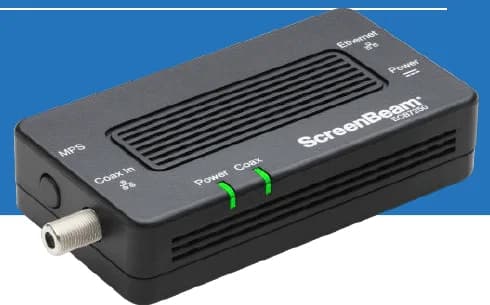
A two-adapter option for wired backhaul when a usable coax path already connects the router area and a weak room.
- 2 adapters in kit
- 2.5GbE port per adapter
- Uses existing coax
Before you buy: Confirm both outlets share a compatible coax system. Satellite and some provider setups are incompatible; DOCSIS 3.1 can conflict. Check splitters and any required point-of-entry filter before buying.
10G-rated Cat6A for reliable backhaul and LAN links
Key details
- Shielded connectors in longer runs to reduce interference
- Snagless boots; easy default for short multi-gig patch runs

Klein Tools
Klein Tools VDV526-100 LAN Cable Tester
A basic wiremap check for an accessible, disconnected Ethernet run when you can reach both ends.
Before you buy: Use only on unpowered cable with permission or after taking possession. It finds opens, shorts and miswires, but does not certify cable speed or replace a professional test report.
Key details
- Verifies pinout and continuity on Ethernet runs
- Remote terminator for one‑person testing
- Useful when validating new backhaul runs

TP-Link
TP-Link LS108GP
A quiet, fanless option for a small mix of cameras and access points.
Before you buy: Check that the combined PoE load fits the 62W budget.
Key details
- 8 x 802.3af/at PoE+ ports with 62W total budget
- Fanless design with PoE Auto Recovery for APs and cameras
- Strong low-cost fit for quiet rooms and lighter endpoint counts
We map usable coax, cable paths, AP locations, and switch needs before hardware gets purchased, then build the network around the rooms that actually need stability.
Troubleshooting a MoCA Setup
Start with the link lights. If both adapters power on but the coax light does not lock, the adapters probably cannot see each other through the coax plant. Move both adapters to two known-good outlets on the same splitter if possible. If they link there, the problem is the home wiring path, not the adapters.
If the MoCA link is up but speed is poor, check the Ethernet side next. A 2.5 Gbps MoCA adapter connected to a 1G switch or 1G mesh node will negotiate at 1G on that side. Bad patch cables, old switches, and weak remote Wi-Fi placement can all make a good MoCA link look worse than it is.
Useful checks:
- Confirm both adapters are on the same coax network.
- Replace old splitters with MoCA-rated splitters where needed.
- Remove unnecessary amplifiers or legacy coax gear from the path.
- Check whether a cable gateway already has MoCA enabled.
- Verify Ethernet link speed at both adapters.
- Test the remote room with a wired laptop before blaming Wi-Fi.
FAQs
Do I need cable TV service to use MoCA?
No. MoCA needs usable coax wiring, not an active cable-TV subscription. You still need internet service from an ISP and a router or gateway to feed the network.
Is MoCA 2.5 faster than Ethernet?
No. Ethernet remains the cleaner dedicated cabling standard, especially for PoE and permanent infrastructure. MoCA 2.5 is valuable because it can create a fast wired path over coax that already exists in finished walls.
Can I use MoCA with mesh Wi-Fi?
Yes. This is one of the best uses for MoCA. Put a MoCA adapter near the router and another near a remote mesh node, then use Ethernet from the adapter into the node's wired backhaul port.
How many MoCA adapters do I need?
Usually one near the router plus one for each remote location that needs Ethernet. If your gateway already has usable MoCA built in, you may not need the router-side adapter.
Why does my MoCA adapter not connect?
The most common causes are isolated coax runs, incompatible splitters, old amplifiers, satellite hardware, missing point-of-entry filtering, or a gateway that already has a conflicting MoCA setup. Map the coax before replacing the adapters.
References and check dates
- MoCA Alliance: MoCA Home 2.5 - checked June 22, 2026
- MoCA Alliance: certified products - checked June 22, 2026
- ScreenBeam ECB7250 MoCA 2.5 adapter - checked June 22, 2026
- ScreenBeam ECB7250 user manual - checked June 22, 2026
- Hitron MoCA complete guide - checked June 22, 2026
Plan the project with a site visit
Confirm wiring, equipment, placement, and installation scope before hardware is locked in.