


- Quick Answer
- Map the Full Power Path
- Load and Runtime Worksheet
- Three Resilience Designs
- Local Operation vs Internet-Dependent Operation
- Cellular Failover Helps WAN, Not Power
- What Still Fails During an Outage?
- Test Before the Storm
- Recommended Backup and Resilience Gear
- Safety Boundaries
- Homeowner Handoff Checklist
- FAQs
- References and check dates
Quick Answer
To keep Wi-Fi working during a power outage, the whole network path needs backup power: ONT or modem, router, switch, access points, and any controller or gateway the system depends on. If only the router is on a UPS, Wi-Fi may stay lit while the internet handoff, PoE switch, cameras, or VoIP phones are already down.
Start with a simple goal:
- Keep the internet handoff, router, and one Wi-Fi access point online for short outages.
- Add PoE switching, cameras, NVR, smart-home controller, and VoIP only if they matter during the outage.
- Add cellular failover only after the local power path is understood.
- Use a licensed electrician for generator transfer, panel work, or permanent electrical changes.
A UPS buys time. It does not guarantee internet service if the provider network is down upstream, and it does not make a cloud service local. The useful design separates local operation from internet-dependent operation before you buy batteries.
- Home network rack setup
- PoE switch sizing guide
- Local-first smart home planning
- NVR vs NAS vs cloud camera storage
- VoIP vs traditional phone lines
Map the Full Power Path
Most outage plans fail because they protect one box instead of the path.
| System | Needs power? | What fails if it is off | Planning note |
|---|---|---|---|
| ONT or cable modem | Yes | Internet service disappears even if Wi-Fi is still broadcasting | Put the ISP handoff on the same UPS plan as the router |
| Router or gateway | Yes | Local routing, firewall, DHCP, VPN, and internet sharing stop | Check real power draw with security features enabled |
| Core switch | Yes | Wired devices, AP uplinks, cameras, and controllers may drop | PoE switches draw far more when feeding APs and cameras |
| Access points | Usually | Wi-Fi clients lose LAN and internet access | Back up at least one AP for basic coverage |
| Cameras | Depends | Recording and alerts stop unless cameras and recorder stay powered | PoE load can dominate UPS sizing |
| NVR or NAS | Depends | Local footage may stop recording or storage may shut down poorly | Plan graceful shutdown for storage devices |
| Smart-home controller | Depends | Local automations, dashboards, and bridge functions may stop | Local-first hubs are more useful during internet outages |
| VoIP phone or ATA | Depends | Calls fail unless internet, router, switch, and phone power stay up | Cell forwarding may be the better backup for long outages |
Load and Runtime Worksheet
Runtime depends on watts, not just the big VA number on the UPS box. A 1500VA UPS may look large, but common 1500VA units often publish only minutes of runtime at high load. That is normal. The design goal is to reduce load before buying a bigger battery.
| Device | Typical planning range | Keep during outage? | Notes |
|---|---|---|---|
| ONT or modem | 8-25W | Yes | Usually required for any internet continuity |
| Router or gateway | 10-40W | Yes | Security inspection, VPN, or multi-gig hardware can raise draw |
| Small non-PoE switch | 5-20W | Often | Keep it if it feeds the AP, office, or controller |
| PoE switch | 20-250W+ | Maybe | Add the switch draw plus every powered AP, camera, and door device |
| One access point | 8-25W | Usually | Back up one central AP before backing up every AP |
| NVR or NAS | 25-100W+ | Maybe | Protect storage only if recording or file access matters during the outage |
| VoIP phone or ATA | 3-15W each | Maybe | Only useful if internet and routing stay online too |
| Smart-home hub | 2-15W | Often | Local control can remain useful even without internet |
Add the devices that must stay on, then size the UPS with headroom. For many homes, the first useful target is not "run everything." It is "keep the ONT, router, one AP, and maybe the smart-home controller online for 30 to 90 minutes."
Three Resilience Designs
| Design | Backed-up equipment | What it preserves | Tradeoff |
|---|---|---|---|
| Small | ONT/modem, router, one AP | Basic Wi-Fi and internet if the ISP remains online | Cameras, whole-home AP coverage, and VoIP may still be down |
| Medium | ONT/modem, router, PoE switch, key APs, smart-home hub | Better Wi-Fi coverage and local smart-home control | PoE load shortens UPS runtime quickly |
| High-resilience | Network core, selected cameras, NVR/NAS, VoIP path, cellular failover | Local recording, business continuity, and backup WAN | Needs careful load planning, documentation, and periodic battery testing |
The medium design is the sweet spot for many homes: one UPS in the network closet, a documented list of backed-up devices, and a PoE budget that does not try to keep every camera and AP alive for hours. For larger camera systems, decide which cameras matter during an outage instead of treating the whole system as one load.
Local Operation vs Internet-Dependent Operation
Some systems keep working locally during an internet outage. Others only look local until the cloud path disappears.
Local-first devices can still run automations, record to an NVR, stream local camera footage, or keep a dashboard available if the LAN and power stay up. Cloud-first devices may lose remote access, app control, rich notifications, voice assistant control, or cloud video history even when the Wi-Fi network itself is still on.
This distinction matters for cameras and smart homes. A local NVR with powered cameras can keep recording during an internet outage. A cloud-only camera may need internet for upload, alerts, and history. A local smart-home controller can keep core lighting scenes running, while a cloud-only routine may wait for the service to return.
Cellular Failover Helps WAN, Not Power
Cellular failover is a backup internet path. It does not power the ONT, router, switch, APs, cameras, or phones.
Add LTE or 5G failover when the local power path is already solved and the home or office needs internet during provider outages. It is most useful for VoIP, remote work, alarm signaling, payment systems, and basic monitoring. It is less useful if the main problem is a dead PoE switch, drained UPS, or devices that depend on local power you did not back up.
Also plan data use. Camera uploads, cloud backups, and video calls can burn through cellular data quickly. A good failover policy keeps essential traffic online and blocks noisy background traffic when the backup WAN is active.
What Still Fails During an Outage?
Good backup planning is partly about knowing what will not survive.
If utility power is out but the ISP network is still alive, a UPS can keep the local network online for a while. If the ISP's upstream plant, local fiber cabinet, neighborhood node, or building handoff is down, your powered router may still have no working WAN. Cellular failover can help with that, but only if the cellular network has coverage and capacity during the same event.
Cloud services are another boundary. A local camera recorder can keep recording while the internet is down, but cloud alerts, cloud video history, remote viewing, and push notifications may pause. Smart-home routines that run locally can continue, while voice-assistant routines or cloud-only automations may fail silently. VoIP can keep working through a powered router and live WAN, but emergency calling, caller ID, and provider failover behavior should be documented before anyone depends on it.
The handoff should say this plainly: what stays on, what becomes local-only, what shifts to cellular, and what stops until power or internet returns.
Test Before the Storm
Do not wait for the first real outage to learn the UPS runtime.
After installation, test a short simulated outage during a calm window. Unplug the UPS from wall power, not individual devices, and confirm which services stay up: internet, Wi-Fi, cameras, recorder, smart-home hub, and VoIP. Watch the UPS load percentage and estimated runtime. If the runtime estimate collapses as soon as cameras switch to infrared at night or a NAS starts writing, the load plan is too optimistic.
Repeat the test after major changes. Adding two access points, a larger PoE switch, a door controller, or a new NVR can turn a 60-minute plan into a 15-minute plan. Batteries also age, so an annual runtime check belongs in the homeowner handoff just like Wi-Fi names and rack labels.
Recommended Backup and Resilience Gear
Use these as category examples, not a complete design. The useful purchase depends on load, runtime target, rack vs shelf location, and whether the system needs cellular backup or just short outage bridging.
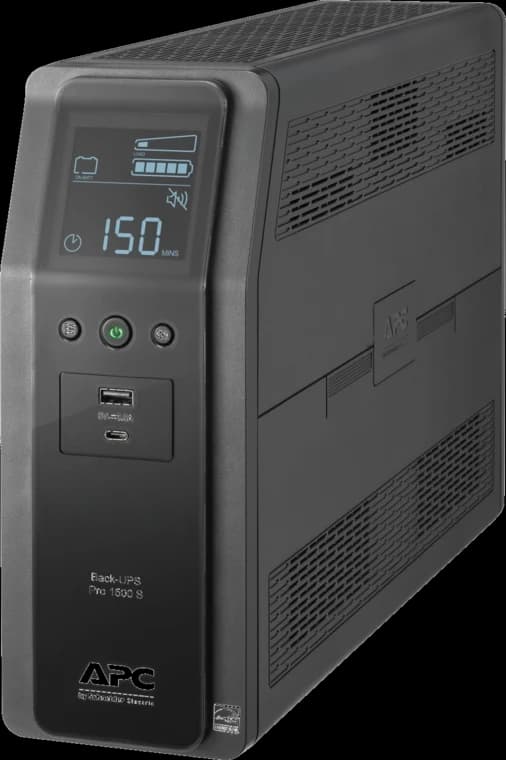
Battery backup for a NAS and essential network equipment; size runtime for your actual load.
- 1500VA / 900W
- 10 outlets
- Tower UPS
1500VA / 1000W pure sine wave UPS for rack and closet installs
Key details
- Short-depth 2U form factor suits compact commercial racks
- Practical backup layer for the PoE++ switch that feeds the access hub

Dual 2.5G RJ45 + 1× GbE SFP + 4× GbE RJ45
Key details
- 2,364 Mbps NAT throughput — handles 2.5G internet plans
- 500,000 concurrent sessions
- WireGuard, IPSec, OpenVPN, L2TP, SSL VPN built in
Ubiquiti
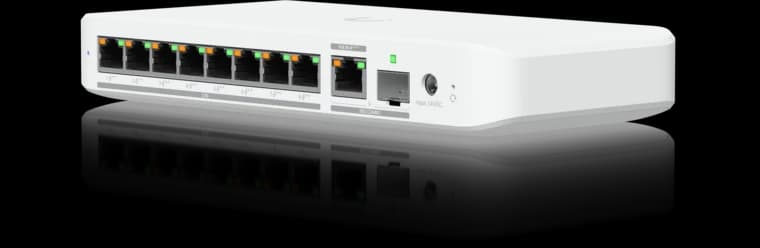
Ubiquiti Switch Flex 2.5G PoE
Eight 2.5GbE PoE++ ports in a compact UniFi switch for a small Wi-Fi 7 and camera deployment.
- 8 × 2.5GbE PoE++
- 10G combo uplink
- Power input affects PoE budget
Before you buy: The AC power adapter is sold separately; available PoE output depends on the power input.
We map the ONT, router, switches, APs, cameras, recorder, smart-home controller, and VoIP path so the UPS protects the actual services you care about.
Safety Boundaries
Low-voltage planning is one thing. Electrical work is another.
Do not backfeed a house, improvise generator connections, run a portable generator indoors, or place a generator near windows, doors, vents, garages, or enclosed spaces. CPSC safety guidance warns that portable generators should be used outdoors and kept at least 20 feet from the home. Permanent generator transfer equipment, panel work, dedicated circuits, and whole-home standby systems belong with a licensed electrician.
For the network side, the safe homeowner tasks are documentation, low-voltage device inventory, UPS runtime testing, and deciding which services matter during a short outage. Leave the electrical infrastructure to the right trade.
Homeowner Handoff Checklist
- Label which UPS outlet powers the ONT, router, switch, AP, recorder, and smart-home hub
- Write down the measured or estimated wattage for each backed-up device
- Document the expected runtime target and the last runtime test date
- Decide which APs and cameras stay online during an outage
- Enable graceful shutdown for any NAS or storage device that supports it
- Document what still fails when the ISP network or cloud service is down
- Store the cellular failover policy, SIM plan, and data limits with the network notes
- Schedule a UPS battery check at least once a year
FAQs
Will a UPS keep my internet working during a power outage?
Only if the ONT or modem, router, and needed network gear are on backup power and the provider network remains online. A UPS cannot fix an upstream ISP outage.
Should cameras stay on during an outage?
Only the important ones. Cameras and PoE switches can drain a UPS quickly. Keep key entry, driveway, or business-critical cameras online before backing up every camera.
Does VoIP work during a power outage?
VoIP can work if the internet handoff, router, switch, and phone or ATA all stay powered and the ISP path is still alive. For long outages, cell forwarding may be more reliable.
Is cellular failover the same as a UPS?
No. Cellular failover replaces the internet path when the main WAN fails. A UPS powers local hardware. Many resilient designs need both.
Can I plug a whole network rack into one UPS?
Sometimes, but calculate the load first. A rack with PoE cameras, APs, recorder, and gateway may need a larger UPS or a reduced outage load plan.
References and check dates
- CyberPower CP1500PFCLCD UPS runtime reference - checked June 23, 2026
- CyberPower CP1500PFCRM2U rackmount UPS - checked June 23, 2026
- APC Back-UPS Pro BR1500MS2 - checked June 23, 2026
- Ubiquiti UniFi LTE Backup Pro tech specs - checked June 23, 2026
- U.S. CPSC generator safety warning - checked June 23, 2026
Plan the project with a site visit
Confirm wiring, equipment, placement, and installation scope before hardware is locked in.