

- Quick summary
- What this smart home prewire rough-in guide should solve
- Pre-wire now, add later, or skip for now
- Core backbone wiring: rack, conduit, and Cat6
- Cost ranges for smart home prewire
- When to involve the builder, electrician, and low-voltage integrator
- Room-by-room rough-in priorities
- Choose your lighting and shade strategy before drywall
- Which devices should stay wireless?
- Detached buildings: when to plan fiber instead of copper
- Common rough-in mistakes
- Westchester renovation notes
- Recommended gear
- Checklist
- FAQs
- References
Quick summary
This smart home prewire rough-in guide is for homeowners, builders, and renovation planners deciding what must be wired before drywall.
Wire the backbone now, not every possible gadget. That means a proper rack location, conduit where future upgrades will be difficult, Cat6 to fixed data-hungry locations, and control or power wiring only for systems you already know you want.
What this smart home prewire rough-in guide should solve
This guide helps you avoid expensive reopen-the-wall decisions by separating infrastructure that should be roughed in now from devices that can be added later.
Homeowners frequently over-invest in visible devices and under-invest in infrastructure. The equipment closet, the path from the basement to the attic, the cable route to a detached office, and the ceiling location for a proper wireless access point matter more than picking touchscreens too early.
When we plan a rough-in, we divide the job into three buckets:
- Wire now because reopening walls later is expensive.
- Leave it wireless or flexible if the product category changes often.
- Only rough it in if you are already committed to that system.
If you use that framework, you get a house that is easier to upgrade without paying to prewire every hypothetical feature.
Pre-wire now, add later, or skip for now
| Pre-wire now | Usually safe to add later | Only wire if you are already committed |
|---|---|---|
| Cat6 to TVs, offices, wireless access point locations, cameras, and a main rack location | Battery leak sensors, contact sensors, smart plugs, table lamps, voice speakers | Panelized lighting, wired shades, in-wall touchscreens, whole-home intercom stations |
| Conduit from rack to attic, basement, and difficult exterior paths | Most smart locks and many thermostats | Dedicated control wiring for a specific shade or automation brand |
| Doorbell wiring review plus optional Cat6 at the front door for future IP door stations | Portable speakers and many plug-in hubs | Specialty AV or audio zones you are unlikely to use |
Infrastructure-heavy items should get wire. Product categories that change quickly should stay flexible.
Bring in the low-voltage plan before insulation so the rack, AP locations, shade power, and exterior pathways are coordinated once instead of patched in later. Talk to a smart home automation planner.
Core backbone wiring: rack, conduit, and Cat6
The low-voltage backbone needs a centralized rack location, strategic conduit, and hardwired Cat6 to permanent device locations.
Choose a dry, accessible, and central location for the equipment rack. In many Westchester homes, that means a basement utility area, a mechanical room, or a dedicated closet that is not sharing space with paint cans and seasonal storage.
That location needs more than a plywood backboard and a modem. Plan for:
- Power outlets with enough spacing for gateway, switch, ISP gear, and accessories
- Ventilation or at least a spot that does not trap heat
- A clean path to the attic, crawlspace, or upper floors
- The service entrance or demarc nearby enough that internet handoff is straightforward
Conduit matters more than most device choices. A one-inch flexible ENT run from the rack to the attic, and another to the basement or crawl route, can save a future project. If you only add one kind of future-proofing, add pathways.
For copper Ethernet, stay realistic about length. Fluke notes that the standard 4-connector copper channel is built around a 90-meter permanent link and 5 meters of patch cable at both ends. If a detached garage, gate, pool house, or long driveway camera location might push you beyond that, plan fiber or an intermediate design now rather than hoping a long copper run will behave later.
Cat6 is still the practical default for most homes. Cat6A can make sense for unusually long runs, high-noise environments, or when you already know you are designing around heavier PoE loads and multi-gig switching. If you want the deeper comparison, see our guide on Cat6 vs Cat6A and when it matters.
Do not forget ceiling access point locations. Modern APs increasingly expect more than basic gigabit backhaul. Ubiquiti's current UniFi U7 Pro, for example, uses a 2.5 GbE uplink and PoE+, which is exactly why AP placement should be discussed during rough-in instead of after paint. Even if you do not buy that model, the trend is clear: clean ceiling Cat6 runs age well.
For straightforward residential rough-ins, we prioritize solid-copper riser Cat6, real 1-inch ENT, and low-voltage brackets over exotic accessories.
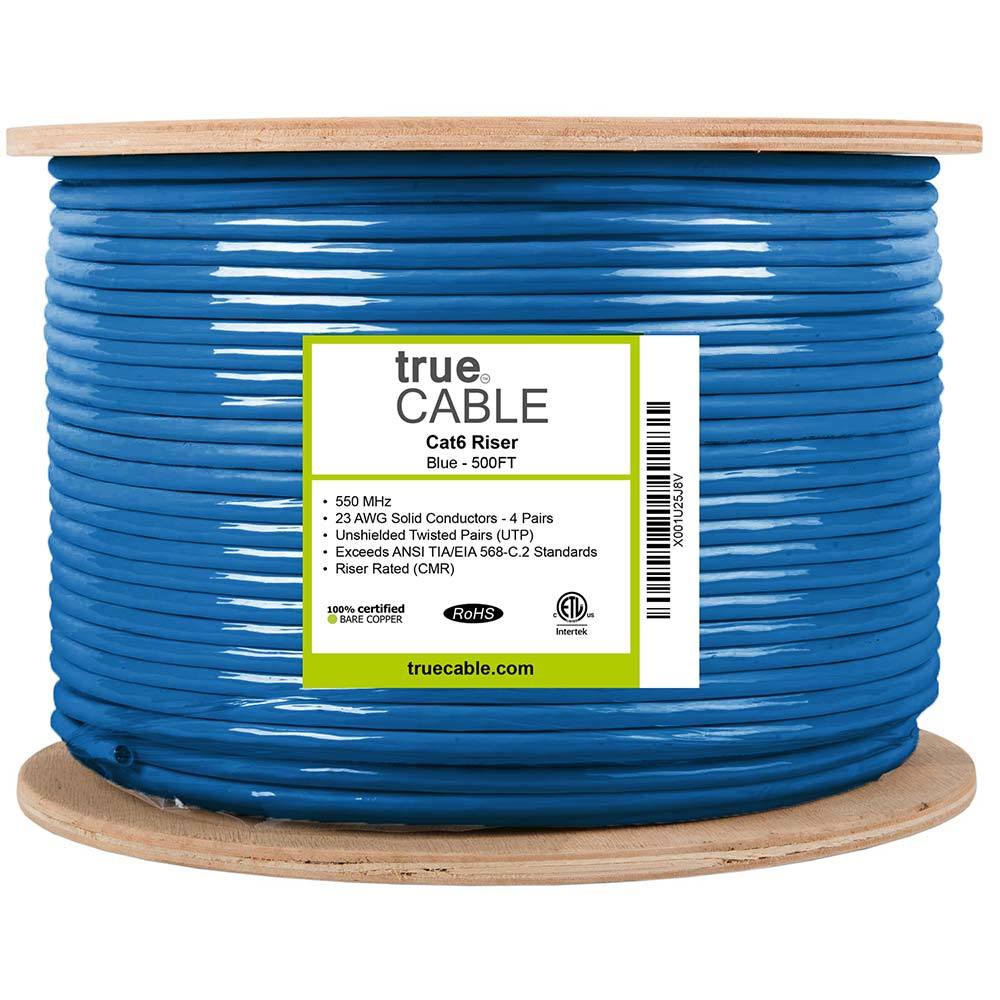
1000 ft riser-rated Cat6 bulk cable for in-wall structured cabling
Key details
- 23AWG solid bare copper conductors suitable for PoE and data runs
- CMR jacket and ETL listing for residential and commercial riser use
Thomas & Betts
Thomas & Betts 12008100 1" BLUE ENT 100' COIL
1-inch blue ENT coil for concealed low-voltage pathways
Key details
- 100 ft coil length fits rack-to-attic and difficult future pull paths
- Purpose-built electrical nonmetallic tubing rather than generic split loom
Single-gang low-voltage brackets for Ethernet, coax, HDMI, and speaker cable terminations
Key details
- Flush old-work style bracket for clean wall plate installs
- Five-pack useful for rough-in planning across office, TV, and network locations
If you need help deciding where that backbone should live, this is the same kind of planning work we do on networking infrastructure projects.
Cost ranges for smart home prewire
Smart home prewire cost depends more on scope and construction stage than on the word "smart."
As of March 3, 2026, a backbone-first prewire for a roughly 3,000-square-foot home usually lands around $3,000 to $7,000 when walls are open. That range is an inference from current Cat6 drop pricing, low-voltage wiring benchmarks, and the usual accessory costs for pathways, brackets, and basic rack prep, not a universal national quote.
Once a project adds centralized lighting, widespread wired shade power, or a larger custom control layer, it usually leaves the basic prewire tier and moves into $15,000+ territory quickly. General hard-wired smart-home cost guides still show broad installed ranges because these projects vary so much by scope, but the important budget distinction is that backbone wiring and full-system integration are different cost categories.
The practical planning rule is simple:
- Backbone-only prewire is the lowest-cost version and usually delivers the best long-term return.
- Whole-home rough-ins cost more because labor, labeling, rack work, and exterior pathways scale with run count.
- Retrofit work costs more per drop than open-wall work because finished surfaces slow everything down.
Material pricing moves around faster than labor. On March 3, 2026, trueCABLE listed its 1000-foot Cat6 CMR box at $194.99 direct. Supply-house pricing for 1-inch ENT was much wider, with current listings ranging from $192.81 per 100-foot coil at Codale to $296.00 at Elliott Electric, while PLATT showed a comparable 1-inch blue ENT listing at $2.68 per foot. Treat Amazon and other marketplace prices as shopping references, not as the baseline for contractor budgeting.
If you want a deeper budgeting framework, see our full network cabling cost guide.
When to involve the builder, electrician, and low-voltage integrator
The low-voltage plan should be coordinated before rough electrical is closed and ideally before the MEP layout is treated as final.
In practice, the cleanest sequence looks like this:
- During planning: decide rack location, TV walls, office drops, AP locations, camera coverage, shade intent, and any detached-building pathways.
- Before rough electrical sign-off: confirm which pathways, boxes, power locations, and backing need to exist before drywall.
- During rough-in: let the electrician handle high-voltage power, lighting circuits, and code-required electrical work while the low-voltage integrator handles data cable, camera wire, AV pathways, rack feeds, and system-specific control wiring.
- Before insulation and drywall: walk the site once to confirm labels, pathway completeness, and any missed TV, doorbell, or exterior locations.
The common failure point is ambiguity. Builders assume the electrician is covering low voltage, electricians assume the AV or network installer will mark everything later, and nobody owns the final pathway plan. A short coordination meeting prevents most of those misses.
Room-by-room rough-in priorities
Permanent device locations should be wired room by room before drywall, especially where access will be expensive later.
TV walls and media areas: Run Cat6 to every serious TV location. Two drops is often better than one if you expect a television plus a streamer, AVR, game console area, or future control gear. If the wall is a premium location, conduit is worth it. We also like to think about power relocation and clean cable paths at the same time instead of treating them as separate projects.
Offices and desks: Home offices keep becoming more important, even in houses that were not designed for them. Any room that could become an office should get at least one good Ethernet location. If there is built-in millwork planned, coordinate the exact wall box height early.
Ceiling APs: Prewire access point positions on each floor, not just wherever the ISP router lands. The goal is predictable coverage, not a fast speed test standing next to one device. If you have a larger footprint, plaster walls, or stone construction, those ceiling drops are worth far more than another consumer mesh node.
Cameras: Exterior camera locations should be decided during rough-in if possible. You do not need every camera on day one, but it is much cheaper to get cable to the soffit, garage corners, driveway approach, and backyard coverage points while walls and ceilings are open.
Front door and gate areas: Standard doorbell wiring is still useful, but this is one of the areas where a little extra planning pays off. Ring's hardwiring guidance shows that wired Pro-class doorbells use specific transformer ranges, not just any random low-voltage doorbell setup. If you might move beyond a simple doorbell into an IP intercom or a more integrated entry stack later, an extra Cat6 near the front entry is cheap insurance.
Outdoor living and detached structures: Patios, outdoor TVs, landscape audio, detached offices, and garages are classic "we wish we had thought of that earlier" zones. If trenching or access will be difficult later, rough in the pathway now even if you do not pull every cable yet.
Equipment-heavy rooms: Mechanical spaces, laundry rooms, and utility rooms can benefit from a network drop as connected appliances, monitoring tools, and smart energy devices keep expanding. You do not have to wire every appliance niche, but leave yourself a path.
For homes that already have a dedicated network area planned, our home network rack setup guide covers the layout and organization side after the cabling is in place.
Choose your lighting and shade strategy before drywall
Lighting control and shade power decisions should be made before drywall because some systems require committed wiring or power choices.
If you are going with standard smart switches in a conventional room-by-room layout, you do not need a huge low-voltage rough-in. But if you are considering centralized lighting, keypad-based control, or wired shades, you need to make those choices before the walls close.
Shades are the clearest example. Lutron's Serena support documentation is explicit: you must choose battery or wired power when you order, and a battery-powered shade is a different model than a wired one. That means shade planning is not just about fabric and style. It affects rough-in.
A practical rule:
- If this is a retrofit or a light renovation, battery shades often keep the project cleaner and faster.
- If this is new construction, large glass, or a high-use whole-home shade project, wired power becomes much more attractive.
- If you are not sure you want shades at all, at least discuss pathways and power opportunities before trim goes in.
The same applies to higher-end lighting control. If you know the project is heading toward keypads, scene control, or equipment-room-based dimming, the wiring conversation has to happen before the electrician closes everything up. If not, keep it simpler and protect budget for the backbone first.
Which devices should stay wireless?
Battery-powered sensors, smart locks, voice speakers, and plug-in hubs should usually remain wireless so the system stays flexible.
These categories rarely justify dedicated rough-in:
- Leak sensors
- Door and window contact sensors
- Smart locks
- Voice speakers
- Plug-in automation hubs
- Table lamps and decorative lighting
Many of these categories change quickly, and many work best when you choose them after you have lived in the space for a few months. The right answer for a front hall, mudroom, or guest room is often clearer after move-in than during framing.
That is also why we tell clients not to obsess over protocol choices during rough-in. Matter, Thread, Zigbee, Z-Wave, and platform decisions are important, but they do not replace good pathways, good AP locations, and good hardwired network points. Those foundations matter regardless of which ecosystem wins the shopping conversation later. If you want help with the platform side, our guides on smart home planning and Matter and Thread in 2026 pick up from there.
Detached buildings: when to plan fiber instead of copper
Detached garages, gates, pool houses, and long exterior runs should trigger a fiber discussion before trenching or conduit is closed.
| Scenario | Copper Cat6 is usually fine | Plan fiber now |
|---|---|---|
| Distance | Short exterior runs well inside copper limits | Runs approaching channel limits or likely to grow later |
| Environment | Simple protected path with low electrical noise | Lightning-prone, electrically noisy, or shared trench environments |
| Use case | Single camera, door station, or modest network extension | Detached office, multiple devices, or future multi-gig backbone |
The point is not to put fiber everywhere. The point is to avoid burying the wrong medium where replacement will be expensive. If you are choosing between prewire and retrofit strategy more broadly, our prewire vs retrofit guide covers that tradeoff in more detail.
Common rough-in mistakes
The same problems show up over and over:
The rack is an afterthought. If the gear lands in a cramped closet with no power, bad airflow, and no path upward, every future change becomes harder.
There is no conduit. Even one or two strategic pathways can turn a painful retrofit into a simple half-day pull.
APs are planned after paint. That leads to tabletop routers, bad coverage, and awkward visible fixes instead of clean ceiling drops.
Only one cable goes to major TV and office locations. One drop sounds fine until you want a display, streamer, control device, wired work machine, or a second-purpose use for the room.
No outdoor planning. Front entry, patio, detached garages, gates, and driveway approaches are expensive to revisit.
Nothing gets labeled. If the installer does not label every cable and location clearly during rough-in, you pay for the confusion later.
Everybody assumes somebody else is handling low voltage. The builder, electrician, AV integrator, and homeowner often each think another person has made the decision. That is how the house ends up with lots of electrical work and very little smart-home readiness.
Westchester renovation notes
In this market, a lot of projects are not clean-sheet new builds. They are older colonials, split-levels, stone homes, or partial gut renovations where some walls are open and others are staying put.
That changes the strategy. In renovations, the highest-return moves are usually:
- Pathways from basement to attic
- Cat6 to office and TV zones
- Access point drops on each floor
- Doorbell and camera planning while exterior walls are accessible
- Shade power planning only where you already know shades are part of the design
Plaster, masonry, and finished ceilings punish late changes. If your scope is limited, prewire the parts of the house that are hardest to revisit and let the easy rooms stay flexible.
This is also where restraint matters. A selective, well-planned prewire usually outperforms a giant wish-list rough-in that never gets finished. If the budget is tight, put it into the backbone and the rooms you know will matter every day.
If you want a second set of eyes before insulation or drywall, that is exactly the point where smart home automation planning saves the most money.
Recommended gear
These are the simple, low-drama pieces that make rough-in work cleaner and future upgrades easier.
1000 ft riser-rated Cat6 bulk cable for in-wall structured cabling
Key details
- 23AWG solid bare copper conductors suitable for PoE and data runs
- CMR jacket and ETL listing for residential and commercial riser use
Thomas & Betts
Thomas & Betts 12008100 1" BLUE ENT 100' COIL
1-inch blue ENT coil for concealed low-voltage pathways
Key details
- 100 ft coil length fits rack-to-attic and difficult future pull paths
- Purpose-built electrical nonmetallic tubing rather than generic split loom
Single-gang low-voltage brackets for Ethernet, coax, HDMI, and speaker cable terminations
Key details
- Flush old-work style bracket for clean wall plate installs
- Five-pack useful for rough-in planning across office, TV, and network locations
Checklist
- Confirm the rack or head-end location, power, ventilation, and service-entry path
- Mark every TV, office, and wireless access point location that should get Cat6
- Add at least one strategic conduit path between the rack and hard-to-reach areas
- Decide now whether shades or centralized lighting are real requirements or just ideas
- Review front-door, gate, camera, and outdoor coverage locations before insulation
- Label every cable and photograph open-wall runs for future reference
FAQs
Should I run Cat6 or Cat6A in a residential home?
Cat6 is the right default for most residential prewires. Move to Cat6A when the runs are longer, the environment is electrically noisy, or you already know the project is built around heavier PoE and multi-gig requirements.
How many Ethernet drops should I run to a TV location?
One is the minimum. Two is the better choice for a primary media wall or any room that may change roles later because it preserves flexibility for streaming gear, control hardware, or a second use without reopening the wall.
Do I need conduit at every location?
No. Put conduit at valuable or difficult-to-revisit paths such as a premium TV wall, a route to the attic, a detached structure trench, or an exterior location that would be painful to reopen later.
Can I add smart shades later if I skip rough-in now?
Often yes, especially with battery shades. But if you think you want wired shades, decide before drywall because some product lines require you to choose battery or wired power at the time of order.
What if my renovation only opens a few walls?
Prioritize pathways, ceiling AP drops, office and TV locations, and front-door or camera zones that will be painful to revisit. In partial renovations, selective prewire beats trying to wire every room equally.
References
Plan the project with a site visit
Confirm wiring, equipment, placement, and installation scope before hardware is locked in.