

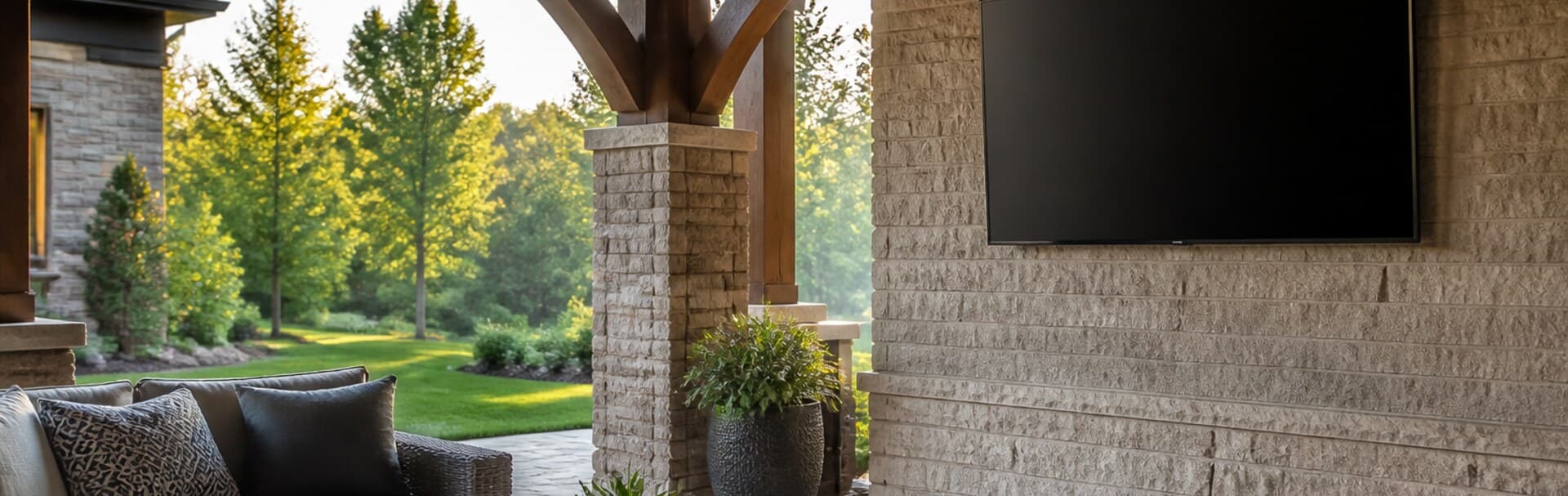
- Quick answer: plan the location before the television
- Classify the patio: shade and rain are separate questions
- Outdoor-rated TV, enclosure, or movable setup?
- Mounting: structure, wind, glare, and service access
- Power and low-voltage wiring need one coordinated plan
- Wi-Fi or Ethernet: test the exact wall
- Outdoor audio: clear sound without turning up the whole yard
- Three outdoor TV plans that hold up
- Seasonal care and homeowner handoff
- FAQs
- References and check dates
Quick answer: plan the location before the television
A durable outdoor TV installation starts with exposure, not screen size. Decide whether the wall is in full shade, partial sun, direct sun, or driven rain. Then choose a display, mount, power plan, cable path, network connection, and audio system rated for that exact location.
A covered porch is not automatically an indoor room. Humidity, condensation, pollen, insects, temperature swings, and wind-driven rain can still reach the equipment. A television made for outdoor use is the safest default for a permanent patio installation. An enclosure or a genuinely movable setup can work in narrower situations, but each brings compromises in heat, glare, convenience, and service access.
The best result usually looks simple because the planning happened before the wall was finished: the screen is shaded, the mount is anchored to real structure, the receptacle is positioned behind or beside the display, the data path stays dry and serviceable, and the patio already has reliable Wi-Fi or Ethernet.
- Classify the location by sun and water exposure before comparing displays.
- Use an outdoor-rated display and outdoor-rated mount for a permanent installation.
- Have a licensed electrician design the outdoor receptacle, GFCI protection, weather protection, and bonding required for the site.
- Test Wi-Fi at the exact mounting wall with the patio in normal use; use Ethernet when a dependable cable path is available.
- Plan audio, glare, seating, winter care, and service access as part of the same project.
Classify the patio: shade and rain are separate questions
Walk the space at the hours when you expect to watch. A north-facing covered porch may remain shaded all afternoon, while a western patio can send low sun directly onto the screen even under a deep roof. Rain behaves differently: a wall may avoid falling rain but still receive spray from wind, a pool, irrigation, or cleaning.
| Location | What to verify | Planning direction |
|---|---|---|
| Full shade | No direct sun reaches the screen during viewing; roof and side protection limit rain | Use a display specifically approved for shaded outdoor installation; keep ventilation and service clearances |
| Partial sun | Bright ambient light or brief angled sun reaches the wall | Choose a partial-sun outdoor display and control glare with orientation, roof depth, or shades |
| Direct sun | The panel receives sustained direct sunlight | Use only a display whose manufacturer approves that exposure and follow its temperature and placement limits |
| Exposed to driven rain or splash | Wind, sprinklers, pool activity, or cleaning can wet the display and connections | Reconsider the wall or add architectural protection; an IP rating is not permission to ignore the installation manual |
| Seasonal or occasional use | The television can be removed and stored after use | A movable system may be more sensible than a permanent wall installation |
IP ratings help compare enclosure protection, but they do not describe every outdoor risk. The code comes from IEC 60529: the first digit relates to solid-particle protection and the second to water protection. A rating does not tell you that a product can be submerged, pressure-washed, left in any temperature, or installed in any sun exposure. Read the complete manufacturer instructions for the exact model.
Samsung, for example, identifies outdoor Terrace models for partial-sun and full-sun conditions and publishes installation limits alongside the IP rating. That is the right way to use a weather rating: as one input in a product-specific plan, not as a blanket promise.
Photograph the proposed wall in the morning, at noon, in late afternoon, and near sunset on a clear day. Note direct reflections from the pool, pale paving, glass doors, and neighboring windows. The late-afternoon angle is often the one a floor plan misses.
Outdoor-rated TV, enclosure, or movable setup?
There are three defensible paths. Compare the complete system rather than only the television price.
| Approach | Best fit | Advantages | Tradeoffs |
|---|---|---|---|
| Outdoor-rated television | Permanent patio or porch installation | Designed and documented for defined outdoor exposure; cleanest everyday use | Higher equipment cost; still requires correct shade, mount, power, and maintenance |
| Weather-protective enclosure | Specialty retrofit where a compatible listed enclosure solves a defined exposure | Can add physical protection and security | Glare, ventilation, sound, bulk, condensation, and service access must all be engineered together |
| Movable television setup | Occasional movie or game nights with dry indoor storage | Lower commitment and no permanent weather exposure | Setup effort, tip-over risk, temporary cable management, and storage discipline |
Do not assume that placing a standard indoor television under an awning makes it outdoor-rated. Even when a homeowner accepts a shorter service life, the equipment warranty, operating-temperature range, humidity limit, cord, receptacle, mount, and connection points still need to match the environment. For a permanent installation, start with products whose documentation explicitly covers the planned location.
If the real decision is between a very large patio television and a protected projection setup, use the projector vs TV room guide first. Projection outdoors adds its own light, screen, wind, storage, and alignment problems; it is best treated as an occasional event system rather than a default permanent display.
Mounting: structure, wind, glare, and service access
Outdoor mounting is not simply an indoor bracket moved outside. The mount needs to match the display's size, weight, and VESA pattern, but it also needs materials and hardware suitable for weather exposure. Purpose-built outdoor mounts use features such as corrosion-resistant coatings and stainless-steel hardware. A standard indoor mount can rust at joints and fasteners long before the television looks worn.
The wall matters just as much. Stone veneer, stucco, siding, hollow masonry, and pergola posts each require a different structural assessment. The visible finish is not necessarily the load-bearing structure. Confirm where the mount transfers its load and whether the assembly can handle an extended full-motion arm. Wind places more leverage on a screen that is pulled away from the wall, so the installation should not rely on finish material or an assumed stud location.
Place the display from the seats, not from a standing position. Outdoor groups sit across wider angles than a typical living room, and people may watch from a dining table, lounge chairs, and a pool at the same time. A modest tilt or swivel can help, but a full-motion mount also creates more movement and cable strain. Locking adjustments and a clear stowed position are valuable.
Avoid mounting directly above a grill, smoker, or open fire. Heat, grease, and smoke are hard on electronics and make the screen unpleasant to clean. A fireplace also pushes the display upward and creates a strong thermal variable. The TV mounting height and power guide explains the viewing-angle problem in more detail.
Leave enough clearance to reach power, data, HDMI, and control buttons without removing the television. Drip loops, sealed cable entries, and service loops should follow the equipment and enclosure instructions. No connection should become a hidden pocket that collects water.
Power and low-voltage wiring need one coordinated plan
Outdoor line-voltage work belongs with a licensed electrician. The electrician should determine the required receptacle type, ground-fault circuit-interrupter (GFCI) protection, weather-resistant components, while-in-use protection, circuit capacity, grounding or bonding, surge strategy, and local permit requirements. Requirements vary with the location and the adopted electrical code, so an indoor receptacle behind a screen is not an outdoor power plan.
The low-voltage installer and electrician should coordinate before either rough-in begins. A useful plan identifies:
- Exact television and mount model, including the bracket's wall footprint and arm movement
- Final receptacle position where the plug and cover remain accessible without interfering with the mount
- A separate low-voltage entry that does not share an unapproved box or pathway with line voltage
- Ethernet, HDMI, optical, speaker, or control cables rated for the pathway and environmental exposure
- A water-shedding cable route with correct exterior penetrations and no low point that traps moisture
- Enough service loop for mount movement without pinching or pulling connectors
- A surge and shutdown plan for the television, network equipment, and audio system
Avoid long, exposed consumer extension cords and improvised power strips. They create trip, water, and connection problems and rarely leave the patio looking finished. If the wall is being rebuilt, add an accessible conduit or raceway sized for future signal changes. HDMI standards and source devices change faster than stonework.
For a broader prewire sequence, the home entertainment and theater planning guide covers source locations, audio, and cable access before finish work.
Wi-Fi or Ethernet: test the exact wall
Outdoor streaming failures often come from a simple assumption: the patio is close to the house, so indoor Wi-Fi must be good enough. Exterior masonry, low-emissivity glass, metal screens, foil-backed insulation, and the angle through the wall can weaken the connection. The mounting wall may also sit at the edge of an access point's coverage.
Test at the proposed screen location, not at the patio door. Use the same time of day and network load expected during a gathering. Check the television wall, the primary seats, and any wireless speakers or controllers. A phone speed test is only a starting point; stability, roaming behavior, and sustained playback matter more than one peak number.
Use wired Ethernet when the television supports it and a protected cable path is practical. Ethernet reduces dependence on the weakest edge of the indoor wireless network. It also gives the project a stable source path even if the household later changes Wi-Fi systems.
If wireless is the right answer, design outdoor coverage instead of turning up the power on a distant indoor access point. Our outdoor Wi-Fi comparison and placement guide explains when an outdoor access point is justified. Keep the access point and its cable route within the manufacturer's exposure limits, and remember that coverage should serve the patio without spilling farther than needed.
- Confirm whether the television supports Ethernet, Wi-Fi, or both
- Test the exact mounting wall with doors and windows in their normal positions
- Decide whether apps will run on the television or on a separate streaming device
- Give any streaming box a dry, ventilated, serviceable location with a dependable control path
- Confirm how guests will cast or sign in without exposing the main household network
- Download updates and test live sports or other high-demand content before the first event
Outdoor audio: clear sound without turning up the whole yard
Television speakers struggle outdoors because there are few walls to reinforce sound. The usual reaction is more volume, which sends dialogue toward neighbors while it remains unclear at the seats. Place outdoor-rated speakers near the listening area and aim them inward. More controlled speakers at lower volume often work better than one loud soundbar trying to cover the whole patio.
An outdoor-rated soundbar can keep the front wall clean, but confirm its weather rating, mounting method, power, control compatibility, and operating limits separately from the television. A pair or small set of architectural outdoor speakers can provide more even coverage. If the house already uses distributed audio, the patio should be planned as its own zone so late-night volume does not follow the indoor rooms.
For system tradeoffs, see the soundbar vs AVR and speakers guide and the Sonos whole-home audio planning guide. Product choice comes after the speaker locations and cable paths are settled.
Three outdoor TV plans that hold up
Covered porch for everyday use
Use a shade-rated outdoor television on an outdoor-rated tilt or full-motion mount. Place weather-protected power and Ethernet at the final bracket location. Add a compact outdoor-rated soundbar or two inward-facing speakers. This is the simplest permanent system when the roof truly controls sun and rain.
Pool patio with mixed sun and splash risk
Move the display wall away from direct splash and irrigation. Choose the screen only after documenting sun exposure at viewing hours. Use a corrosion-resistant locking mount, minimal visible cabling, and speakers aimed toward the seating rather than across the property. Confirm every component's placement rules; do not use the IP rating as a reason to put connections in a wet pocket.
Occasional backyard movie or game night
Use a movable system that stores indoors and has a deliberate setup checklist. Provide a safe viewing location, stable stand, protected power designed by an electrician, and temporary cables routed away from walking paths. This path avoids leaving electronics outside, but it requires someone to set up and store the system every time.
We can assess sun, weather exposure, viewing angles, structure, low-voltage pathways, network coverage, and speaker placement before equipment is ordered.
Seasonal care and homeowner handoff
The final walkthrough should explain what to inspect, what to cover, what to bring inside, and when to shut the system down. Northeast freeze-thaw cycles, pollen, insects, summer heat, and wind-driven storms change the maintenance load even under a roof.
- Follow the display manufacturer's cleaning method; do not spray cleaner or water directly into seams or connections
- Inspect the mount, fasteners, cable jacket, covers, seals, and wall penetrations at the start and end of each outdoor season
- Check that mount movement does not pinch, twist, or tension power and signal cables
- Clear leaves, nests, dust, and pollen without blocking required ventilation
- Use only a cover approved for the installed equipment and never trap heat or moisture around an operating television
- Document the breaker, network connection, source devices, remotes, app ownership, and shutdown procedure
- After severe wind, water intrusion, impact, or visible corrosion, stop using the system until it is inspected
FAQs
Can I put a regular indoor TV on a covered patio?
A roof reduces exposure, but it does not make the location an indoor environment. Humidity, condensation, temperature swings, pollen, insects, and wind-driven moisture remain. For a permanent installation, use a display whose manufacturer explicitly approves the planned outdoor exposure.
What IP rating should an outdoor TV have?
There is no single IP number that makes every installation safe. The rating describes defined enclosure protection, while the product manual covers sun, temperature, mounting, connectors, and other limits. Match the complete manufacturer guidance to the exact location.
Is Wi-Fi good enough for an outdoor TV?
It can be, but test at the mounting wall. Exterior materials and low-emissivity glass can weaken a signal that looks strong indoors. Use Ethernet when practical, or design intentional outdoor Wi-Fi coverage when the patio sits beyond reliable indoor coverage.
Does an outdoor TV need a special mount?
Use a mount approved for outdoor exposure and compatible with the television's size, weight, and VESA pattern. Outdoor mounts are designed with corrosion resistance and suitable hardware; the wall structure and wind leverage still need professional assessment.
Who should install power for an outdoor television?
A licensed electrician should design and install the outdoor receptacle, ground-fault protection, weather protection, circuit, grounding or bonding, and any permit-required work. The electrician and low-voltage installer should coordinate the final mount and cable locations.
References and check dates
- IEC 60529: Degrees of protection provided by enclosures - checked September 1, 2026
- Samsung: The Terrace outdoor TV guidance - checked September 1, 2026
- Leviton: weather-resistant GFCI and while-in-use outdoor assembly - checked September 1, 2026
- SANUS: outdoor full-motion TV mount - checked September 1, 2026
Plan the TV, sound and wiring with a site visit
Walk the room with us to settle TV height, speaker placement and where the cables and equipment will go before anything is installed.